
SpotsPOS Repair
Buyback software that buys right and keeps the record.
Buying used phones, tablets and laptops from customers is good money when every purchase is checked, priced the same way and on paper. SpotsPOS Repair walks your staff through each buyback, from the IMEI check to the bill of sale, and follows the device until it sells.
Free for 14 days. No credit card needed.
Everything a buyback needs, in the order you need it
A buyback in SpotsPOS has four steps: Items, Seller, Payout and Done.
-
IMEI checks before you pay
Every IMEI is checked for a valid format and for duplicates, so you know if it is already in your inventory, was sold by you before or was bought before. When a lost or stolen check is set up for your shop, it runs too.
-
A condition checklist that suggests the grade
Staff tap pass or fail on each line: powers on, screen has no cracks, no iCloud or Google account lock and more. SpotsPOS suggests a grade from New to DOA, and you can change it.
-
A price list everyone follows
Save what you pay per model and grade, in cash and in store credit, plus a target resale price. Every employee offers the same amount, and you decide whether they can change it.
-
Seller ID, signature and PIN
Record the seller's ID type and number, take a photo of the front and back, and collect a signature on your own agreement. The employee confirms with their PIN.
-
Pay the way the seller wants
Cash or trade-in through Checkout, store credit added to their account right away, or a bank transfer you record. Offer a store credit bonus to keep the money in your shop.
-
Quotes and a bill of sale
Save an offer as a quote and pay it when the seller comes back, or void it. Paid buybacks print a bill of sale with the seller's signature and a reference number.
How a buyback works at your counter
-
Add what you are buying
Choose a device with an IMEI or serial, more units of something you already stock (its cost is averaged), or another item without a serial. Scan the IMEI barcode with the camera and add photos. One buyback can hold several items.
-
Inspect and grade
Run through your condition checklist. Failed lines push the suggested grade down, and a critical failure suggests DOA. The offer fills in from your price list for that model and grade.
-
Record the seller
Select the customer who is selling, then capture what your shop requires: ID type and number, ID photos, signature and the employee PIN. SpotsPOS warns you if the ID has expired or the seller is under 18.
-
Pay and put it to work
Choose cash, trade-in, store credit, bank transfer or other. Then decide what happens next: put it up for sale with a resale price and warranty, keep it for the shop, or use it as a loaner during repairs.
Know what your trade-ins really earn.
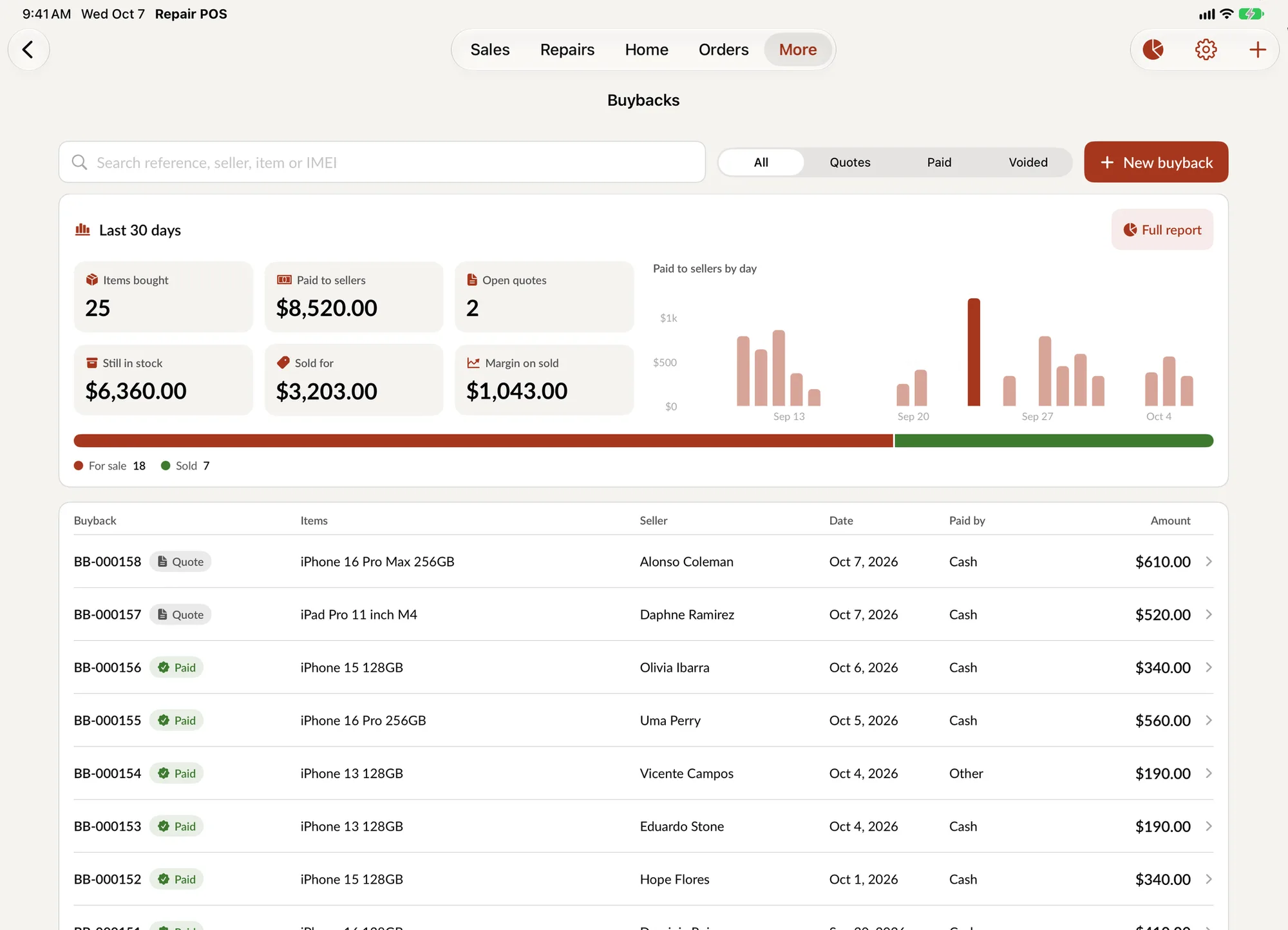
The Trade-in report shows the money in and the money out for any date range: items bought, paid to sellers, average paid, what is still in stock, what sold, the margin on sold items and the average time to sell. Each number is compared with the previous period.
- Charts by grade, by employee, by payout type and most bought models
- Refurbishing costs are added to the device, so margin stays honest
- Export the report, or a purchase log with seller and ID details
Why use buyback software instead of a notebook
Most repair shops already buy used devices. A customer upgrades, hands over the old phone and asks what it is worth. The risk is not in the buying. It is in buying a device that is locked or reported stolen, paying two different prices for the same model depending on who is at the counter, and losing track of the device once it is on the shelf.
Buyback software fixes all three. SpotsPOS checks every IMEI before money changes hands, uses one price list for the whole team, and gives every bought device a place in your inventory with its cost, grade and history.
Built for the rules around secondhand goods
Many areas require shops to record the seller's ID for secondhand purchases, and some require you to hold an item for a number of days before selling it. SpotsPOS lets you turn on what your area asks for:
- Seller ID: ID type and number, issuer and expiration, with ID photos stored privately with the buyback. Only your shop's staff can open them.
- Hold period: set the number of days to hold bought items. A device on hold cannot be sold at checkout until the hold ends.
- Signature: the seller signs your agreement, in your own wording or the standard text, and it prints on the bill of sale.
- Block flagged devices: when a lost or stolen check is set up, a flagged device cannot be paid for.
Check your local rules to choose the right settings.
From buyback to resale
A bought device does not end at the payout. If it needs work, start refurbishing and add the parts (taken straight out of your inventory), labor and other costs. The device's cost includes them, so the margin you see when it sells is the real one.
When it is ready, the device shows up for sale at checkout and in device management, tracked by IMEI with its grade, price and warranty. A trade-in goes straight into the customer's sale and lowers what they owe, so a customer can trade in their old phone toward a new one in a single checkout.
A typical buyback, start to finish
A customer brings in an iPhone to sell. Your employee scans the IMEI: valid, never seen before. The checklist finds a scratched back, so the grade suggests B and the price list fills in the cash offer and a slightly higher store credit offer. The customer takes store credit. The employee photographs the ID, the customer signs and the employee enters their PIN. The bill of sale prints, the credit is on the customer's account and the phone waits out your hold period before it goes up for sale.
Buyback questions
How do I buy used phones from customers safely?
Check the IMEI before you pay, inspect the device against a checklist, record the seller's ID and get a signature on a bill of sale. SpotsPOS Repair builds each of these into the buyback, and you choose which ones your shop requires.
Can I check if a phone is reported lost or stolen?
Every IMEI is checked for a valid format and for duplicates in your shop. A lost or stolen check runs on every IMEI when one is set up for your shop, and you can block flagged devices from being paid for. If it is not set up, the checklist reminds staff to confirm there is no account lock by hand.
Can a customer trade in a device toward a purchase?
Yes. Start the buyback from Checkout with Create Buyback and choose Trade-in. The amount goes into the sale and lowers what the customer owes. Note that discounts are not available on a sale that includes a buyback.
Can I offer store credit instead of cash?
Yes. Every offer has a cash amount and a store credit amount, and you can set a store credit bonus percentage so credit is worth more to the seller. Store credit is added to the customer's account right away.
Is buyback included in my plan?
Buyback is included in every SpotsPOS Repair plan. Plans differ in team size and extras like advanced reporting, so see pricing for the details.
Make your next buyback a clean one.
Start a 14 day free trial and set up your price list today.
Free for 14 days. No credit card needed.