
SpotsPOS Repair
IMEI tracking software for every device you sell.
Device Management keeps the phones, tablets and laptops you sell in two simple layers: the device, like iPhone 13 128GB, and each unit under it with its own IMEI or serial, grade, cost and warranty. You always know what is on the shelf, what sold and to whom.
Free for 14 days. No credit card needed.
What Device Management tracks for each unit
A used phone is not a box of screen protectors. Two units of the same model can differ in condition, cost and price. IMEI tracking keeps each one separate.
-
IMEI or serial, scanned
Point the camera at the IMEI or serial barcode and it is read for you. Search any unit by IMEI or serial later, from Device Management or at checkout.
-
Grade and condition
Grade every unit New, A, B, C, D or DOA, each with a plain description, from like new to for parts. Add notes and photos of its condition.
-
Cost, price and margin
Record what the unit cost you and what you sell it for. Once it sells, you see the sale date and the margin on that exact unit.
-
Warranty that starts at sale
Set a warranty in days, weeks, months or years, or lifetime. It starts the day the unit is sold, and the unit shows whether it is still covered or the warranty has ended.
-
Loaners for repair customers
Mark a unit as a loaner and keep it to lend to customers while their own device is in for repair.
-
Labels with a QR code
Print a device label for each unit. Scan its QR code at checkout or in search to open that unit straight away.
Parent devices, child units.
Create a device once with its name, SKU, sale price, warranty and tax. That price and warranty apply to every unit of it. Then add each unit with its IMEI or serial, grade and cost. The device list shows how many are in stock, and opening one lists its units, filtered by For sale, Sold or Loaners.
- Every unit has a status: for sale, not for sale, on hold, refurbishing, loaner or sold
- Units bought from customers are marked as buybacks
- Link a customer to a unit, and open its sale from the Payments tab
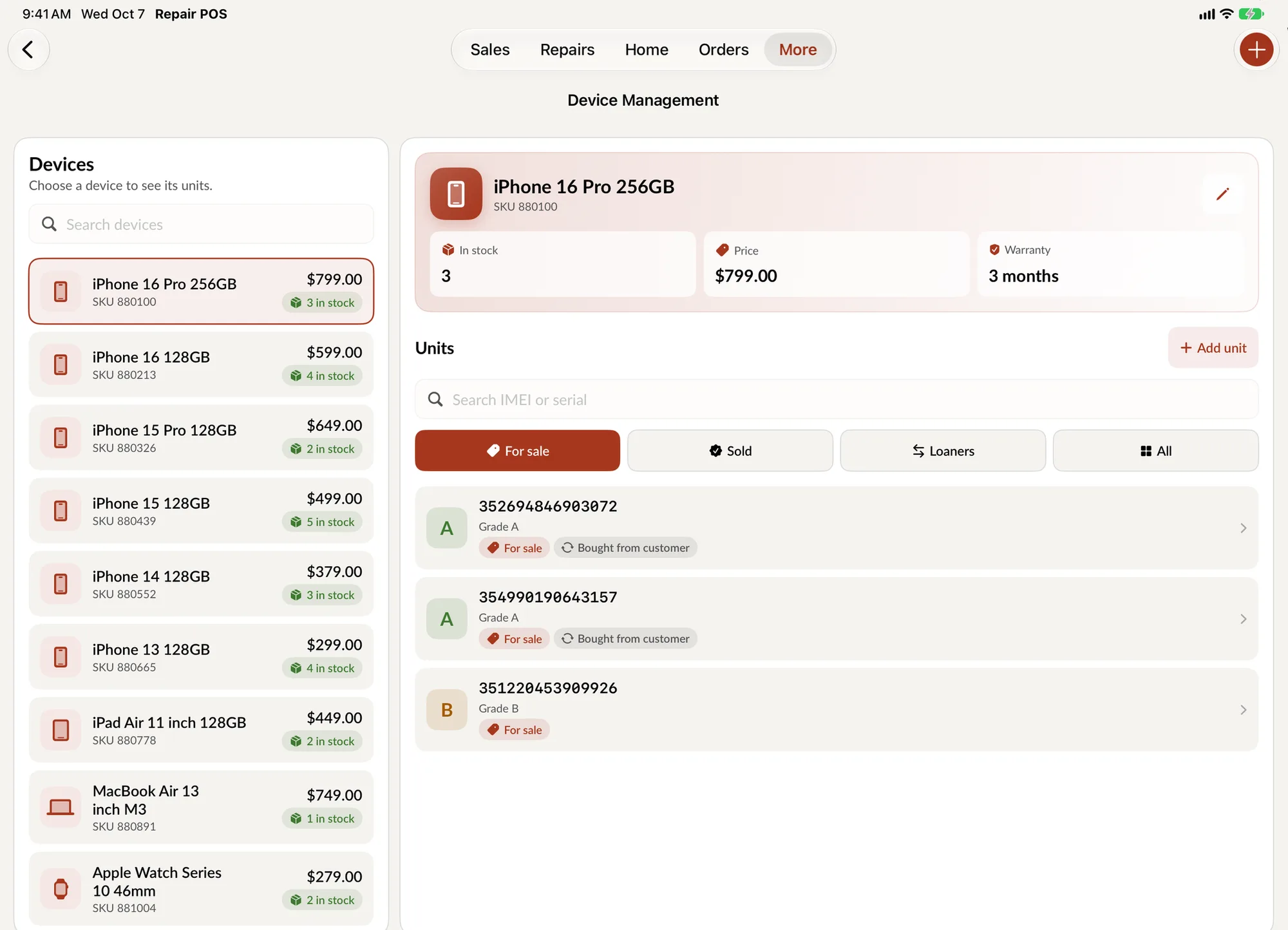
How to track devices by IMEI in SpotsPOS
-
Create the device
Add a device for each model and configuration you sell, such as iPhone 13 128GB, with a SKU and a sale price. A preview shows how it will look in your list.
-
Add each unit
Scan or type the IMEI or serial, choose the grade, enter the store cost and decide whether it is for sale or a loaner. Units bought through a buyback are added for you.
-
Sell it at checkout
Search the IMEI at checkout, scan the unit's label, or tap Sell this device from its details. The unit is marked sold and its warranty begins that day.
-
Look it up later
When a customer comes back with a question, search the IMEI or serial and see the grade, the sale, the price and how much warranty is left.
Why IMEI tracking matters when you sell used devices
Selling refurbished and used phones is good business for a repair shop, but only if you can answer three questions about any unit at any time: where did it come from, what did it cost, and is it still under warranty. A spreadsheet answers them until the day someone forgets to update it.
IMEI tracking software ties the answers to the one number that never changes on a phone. In SpotsPOS Repair, every unit's IMEI or serial is the key to its grade, cost, sale and warranty. When a customer walks in saying "you sold me this phone and the battery is failing," you search the IMEI and see the date it was sold and whether the warranty still covers it, in seconds.
Where the devices come from
Most units enter Device Management in one of two ways. You add them yourself when you buy stock from a supplier, or they arrive through a buyback, when a customer sells or trades in a device at your counter. Buyback units carry their history with them: the status shows they were bought from a customer, and any hold period or refurbishing work shows on the unit before it can be sold.
Loaners: a small thing customers remember
Lending a phone while a repair takes a few days keeps a customer loyal. Mark any unit as a loaner, filter to see which loaners you have, and hand one over when you check in a repair. The rest of that job is tracked on its repair ticket.
Device Management and inventory
Device Management handles units that each need their own identity. Parts, accessories and other products live in your regular inventory, counted by quantity. Both show up in the same checkout, so a customer can buy a refurbished phone, a case and a screen protector in one sale.
Good habits for clean device records
Create one device per model and storage size, not per color or condition, and use the grade for condition.
Scan instead of typing. The camera reads the barcode, and a scanned IMEI never has a typo.
Print a label for every unit as it goes on the shelf. At checkout, scanning the label opens the exact unit, not just the model.
Device tracking questions
How do I track used phones by IMEI?
Create a device for each model you sell, then add every unit with its IMEI or serial number, grade and cost. In SpotsPOS Repair you can scan the IMEI barcode with the camera and later find any unit by searching its IMEI or serial.
What is the difference between a device and a unit?
The device is the model you sell, such as iPhone 13 128GB, with one SKU, sale price and warranty. Units are the individual phones under it, each with its own IMEI or serial, grade, cost and status.
How do warranties work on devices I sell?
You set the warranty on the device, from days to years or lifetime. Each unit's warranty starts the day it is sold, and the unit shows if it is still under warranty or when it ended.
Can I lend devices to customers during a repair?
Yes. Mark any unit as a loaner and it is kept for lending instead of shown for sale. Filter by Loaners to see what you have available.
Is Device Management included in every plan?
Device Management is part of SpotsPOS Repair's inventory, which every plan includes. Some advanced inventory features depend on your plan, so see pricing for what each one includes.
Know every device on your shelf.
Start a 14 day free trial and add your first device today.
Free for 14 days. No credit card needed.