
SpotsPOS Repair
Game console repair shop software for every port, fan and stick.
HDMI ports, drifting joysticks, consoles that shut off in the middle of a game. SpotsPOS Repair is game console repair shop software that turns your everyday fixes into one tap tickets and keeps trade-ins and used console sales in the same app.
Free for 14 days. No credit card needed.
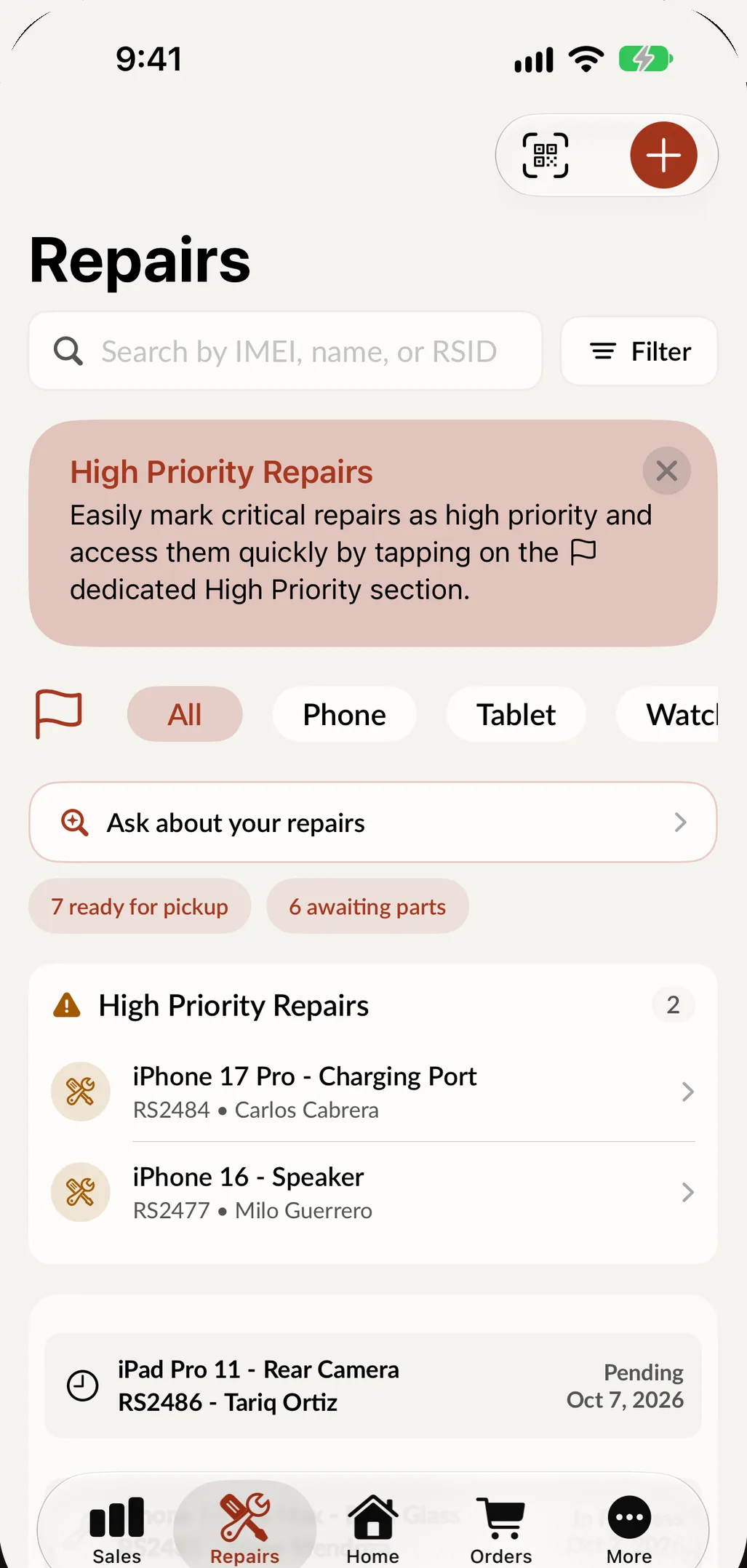
Built around the jobs on a console bench.
Most console work is a handful of jobs done over and over, plus the odd board repair that takes a day. Both fit.
-
Controller drift in one tap
Save stick replacement as a Quick Repair with its parts and price. When a family drops off three controllers, three tickets take seconds.
-
HDMI ports and board work
Microsoldering is one of the common repairs from day one. Link the HDMI port to the repair type and the part and price fill in on their own.
-
What works before you open it
Set up a checklist per repair type, such as disc drive, Wi-Fi, USB ports and fan, and tick what works at check in. No picture at all? Mark it not testable.
-
Serial numbers on every console
Scan the serial barcode with the camera so the right console goes back to the right customer. Search any repair by serial, name or ticket number.
-
Trade-ins with a price list
Set what you pay per model and grade, so every employee offers the same amount for a used console, in cash or store credit.
-
Games and accessories
Sell games, controllers and cables through the same checkout. Spots Intelligence suggests the accessories that usually sell with what is on the sale.
Buy it, fix it, sell it again.
A used console is inventory once you buy it. Start a buyback, answer a condition checklist you write yourself, and SpotsPOS suggests a grade. Pay in cash, as store credit with an optional bonus, or as a trade-in that lowers what the customer owes. Then add the parts and labor you spend refurbishing it, so the margin on the resale is real. More in buybacks.
- Your own checklist lines, in the order you test
- A hold period before bought items can be sold
- A bill of sale signed by the seller
A console that overheats, from drop-off to pickup
-
Check it in
Choose the console and the service, or say it in one go: PS5, shuts off after ten minutes, no rush. SpotsPOS fills in what matches your catalog.
-
Note what came with it
Scan the serial, tick what works, add photos and note the controller, cables or stand left with the console. The customer signs your terms.
-
Diagnose and quote
Write a diagnostic, add the fan or thermal parts, and take a deposit. If the customer needs to approve, the status says Waiting on customer.
-
Repair and test
The technician logs time on the ticket and moves it to Repaired once it holds up under load.
-
Hand it back
Notify the customer, take the balance, set a warranty period and sell them a controller while they are at the counter.
Game console repair shop software for the everyday problems
Volume jobs at a fixed price
Stick drift, HDMI ports, cleaning and fresh thermal paste: these are the jobs that pay the rent, and they should take seconds to ring up. Save each one as a Quick Repair with its parts and price. With Spots Intelligence on, Smart Quick Repairs builds that list for you from the repairs your shop does most, with accurate pricing.
Your catalog, your consoles
Add the device types, brands and models you actually see, from current consoles to handhelds and retro systems, and link each repair type to its parts. The Repairs list filters by device type, and Ask your shop can tell you which devices came in most this month.
Parts that take a week
When a console needs a part you do not stock, create an order for it with the customer's price, your cost and the tracking number, and follow it from Ordered to Received. The repair sits in Awaiting Parts meanwhile, and Spots Intelligence can suggest a status note for the customer, like waiting on a part, work resumes when it arrives. You review it before saving, because the customer can see it.
Used consoles and games
Each used console is tracked as its own unit in Device Management: serial number, grade, price, warranty and where it came from. Games and accessories without a serial number go into regular inventory, and when you buy more of something you already stock, its cost is averaged. Inventory counts can be done by scanning barcodes, with differences highlighted.
Busy weekends
Popular Times shows your busiest hours so you can staff the counter, and on the Pro plan Employee Manager handles the schedule and the time clock.
Tools and parts for a game console repair bench
You do not need a lab to start, but a console bench needs a few things a phone bench may not. A starting list, grouped by the jobs that bring consoles in:
| Job | Tools | Parts to keep on the shelf |
|---|---|---|
| Opening consoles and controllers | Precision driver set with Phillips, Torx, security Torx and tri-wing bits (the mix changes by console and controller), plastic spudgers and opening picks, an ESD mat and wrist strap | Replacement screws and shell clips |
| Stick drift and worn buttons | A soldering station, desoldering braid or a desoldering pump, flux | Joystick modules, thumb sticks, buttons, triggers and ribbon cables for the controllers you see most |
| HDMI ports and board work | A hot air station, a stereo microscope or a good magnifier, a multimeter, leaded solder and flux | HDMI ports for each console you fix, plus the small parts that fail around them |
| Overheating and loud fans | Isopropyl alcohol, lint free swabs, a brush and an electric duster | Fans, thermal paste and thermal pads in the thicknesses each console uses |
| Disc drives | The same driver set, and patience | Drive parts or whole drive units for the models you service |
Two habits save money on this bench. First, look up the cooling layout before you open a console: some current models use liquid metal instead of paste and need a different procedure. Second, test every repair under load, running a game for a while, before it goes back to Repaired.
Keeping those parts in stock
In SpotsPOS, every part on that list is an inventory item linked to the repair types that use it, so a Quick Repair takes its HDMI port or joystick off the shelf count as soon as it goes on a ticket. Low stock shows up before you run out, purchase orders reorder from your vendors with shipping and tax added, and receiving an order updates stock and the average cost. Print barcode labels for parts bins, and count them by scanning. More in inventory management.
Try the intake flow yourself.
This demo follows the real Create Repair screens. It runs in your browser with sample data.
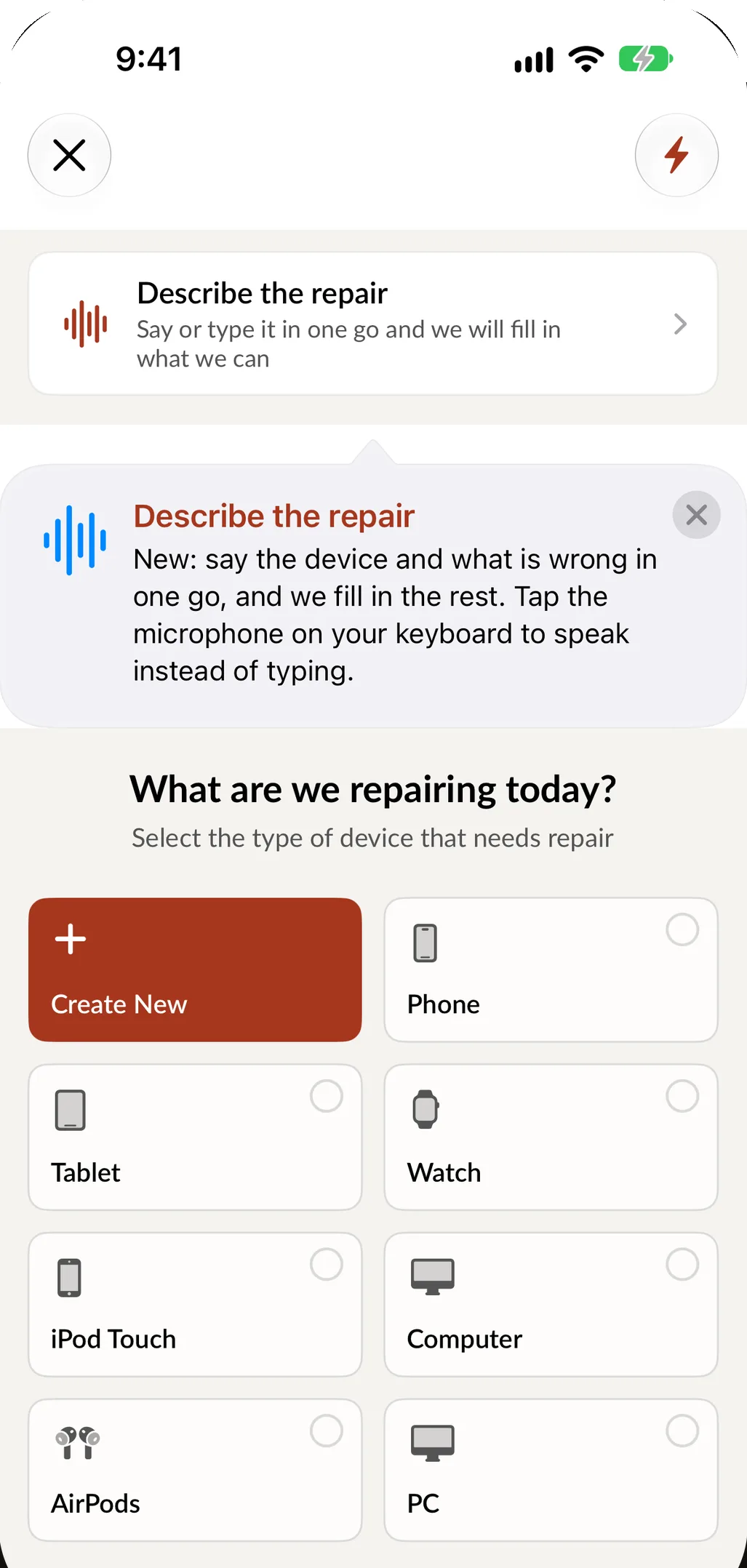
This demo runs in your browser with sample data. Nothing you enter is saved or sent anywhere.
Questions game console repair shops ask
Can I add the consoles and repairs my shop actually does?
Yes. You create the device types, brands, models and services, and link the parts each repair type uses. Retro consoles and handhelds work the same way as current ones.
How do I price controller repairs quickly?
Save each common controller job as a Quick Repair with its parts and price. Starting a ticket from it takes one tap, and the parts come out of inventory with the job.
Can I buy used consoles and games from customers?
Yes. Buybacks record the seller, the condition checklist, the grade and the payout, and add the items to inventory. You can require the seller's ID, a signature and an employee PIN, depending on your local rules.
Can I sell games and accessories in the same app?
Yes. Games, controllers and cables are regular inventory items. Scan them at checkout, add them to a repair sale, and track low stock.
What tools do I need to start repairing game consoles?
A precision driver set with Phillips, Torx, security Torx and tri-wing bits, plastic opening tools, an ESD mat, a soldering station, a hot air station and a microscope for HDMI ports, a multimeter, and cleaning and thermal supplies. Stock joystick modules, HDMI ports, fans and thermal pads for the consoles you see most.
Is Spots Intelligence included?
Smart Quick Repairs, suggested parts and product recommendations are part of Spots Intelligence, included from the Essential plan. See pricing.
Put your next console on a SpotsPOS ticket.
Start a 14 day free trial and save your first Quick Repair today.
Free for 14 days. No credit card needed.