
SpotsPOS Repair
Repair franchise POS software for every location.
Run a repair chain or franchise from one account: every shop, every team and every report, one tap apart.
Free for 14 days. No credit card needed.
25+
WilTech locations run on SpotsPOS
WilTech runs its shops on SpotsPOS: the same app at every counter, with every location in one account. Read the Wiltech story.
Built for chains and franchises with 4 or more locations
Each shop keeps its own inventory, employees and numbers. You see all of them from one login.
-
Shop Management
Every location in one searchable list, with the best selling shop at the top. Add a new shop when you open one.
-
Reports by location
Open any shop for its sales, sales tax, repairs, inventory cost, employee and end of day reports.
-
Inventory transfers
Browse another shop's available stock and request a transfer. The sending shop approves it and both counts update.
-
Vendor network
Share your stock with other locations by store ID so they can order from you on purchase orders.
-
Repair transfers
Send a repair ticket to another shop when the job belongs there, without retyping it.
-
Roles and PINs per shop
Everyone signs in with their own PIN, has a primary shop and sees only what their role allows.
What repair franchise POS software has to handle
One shop can run on habits. Four shops cannot. Once you pass three or four locations, the questions change: which store had the best week, where the stock you need today is sitting, and how fast can a new location open with the same setup as the rest. Good repair franchise POS software answers those questions from one screen, while each location still runs its own counter, its own bench and its own cash drawer.
SpotsPOS Repair was built shop first, on iPhone and iPad, with a Web Portal for the back office. For chains and franchises, every location lives in one account, and you move between them in a tap. Read how this works day to day on the multi-store page.
One login, every shop
Shop Management lists every location on your account, shows each one as active or inactive, and puts the best selling shop at the top. Search the list by name when it grows. Tap a shop to open its overview: the employees who work there, new customers this month, and that shop's full set of reports.
Your team works the same way. Each employee has a primary shop. Store managers can be given administrative rights to more than one shop, so they switch shops without a second login. The Employee Manager screens (timesheets, schedules and meetings) also let you switch store, so you review one location's hours at a time.
Moving repairs and stock between locations
A customer drops a phone at the mall store, but the board repair happens at the downtown shop. With Transfer Repair, you pick the shop and the ticket moves there.
Parts work the same way. From Inventory, open Other Shop Inventory, choose a store and tap the items to transfer into yours. The sending shop sees a transfer request with its overview and approves or rejects it. When it is approved, each item's status log shows "Transferred out" on one side and "Received via transfer" on the other, and the History tab keeps every past transfer.
For locations that buy from each other, Share Inventory opens your stock to another store by its store ID. They order from you on a purchase order, and you approve the quantity you can fill. You can revoke access at any time. More on counts, low stock and labels in inventory management.
Comparing shops with reports by location
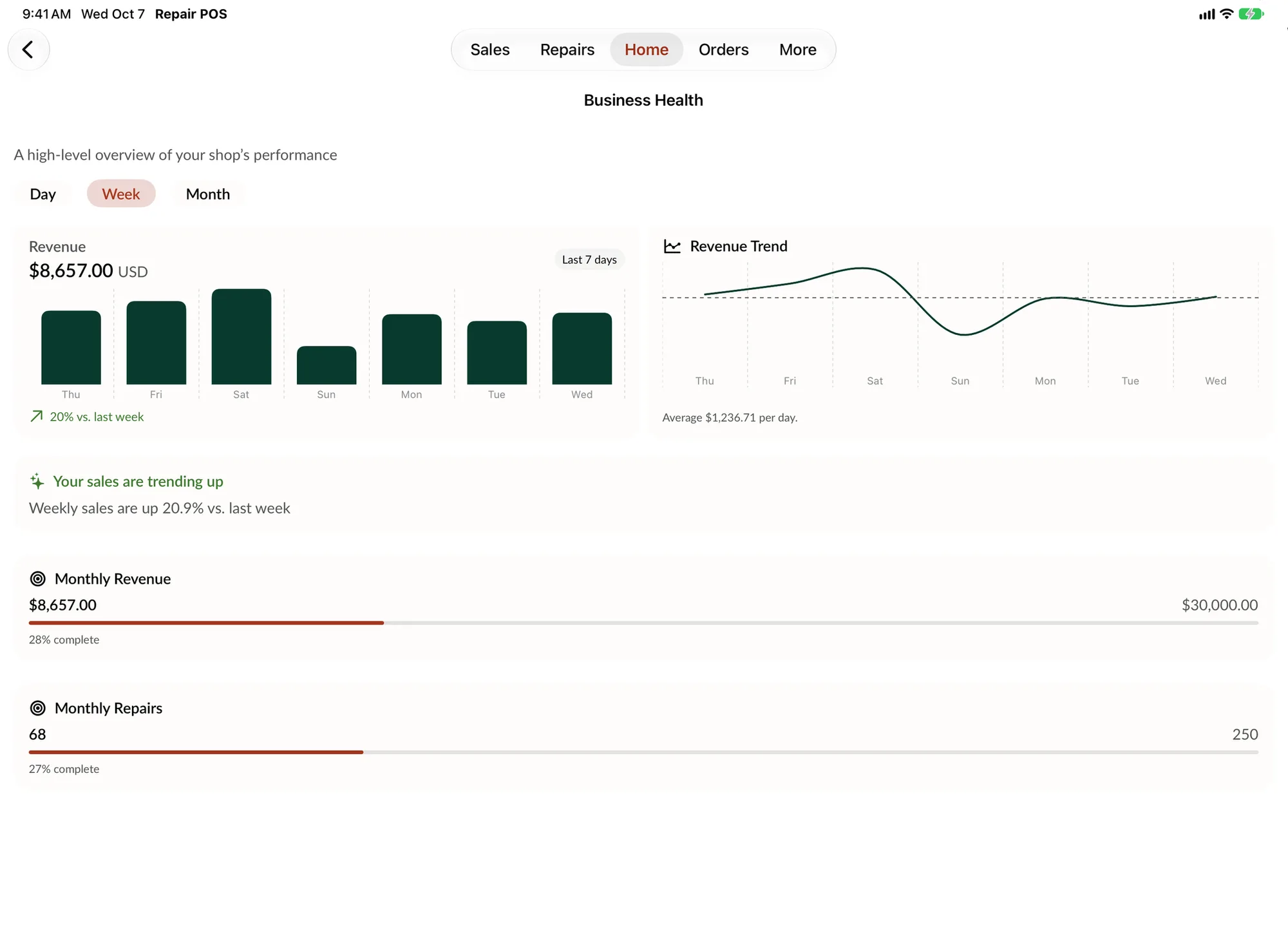
Every shop has the same report set, so comparing them is fair: Sales Overview, Daily and Monthly Sales, Sales Tax, Store Repairs, Monthly Repair, Items, Low Stock Items, Total Inventory Cost, Employee Sales, Employee Repairs and End of Day. Business Health shows each shop's revenue, goals and trends by day, week or month. You can also export customers, inventory, devices and sales. See reports for what each one shows.
Control at every counter
Franchise owners need the same rules in every store. With Employee Limitations you can hide repairs, appointments, inventory, orders or sales from a person, turn on blind inventory counts, or stop someone from signing in. Store Mode hides administrative features at the counter and asks for an employee code on sales, repairs and inventory counts. You set a default PIN timeout for everyone, or a different one per employee, and you can get an email after each employee login. Employee permissions covers every setting.
Spanish for Latin American franchises
The whole app works in English and Spanish, receipts and reports can print in either language, and you choose the currency you sell in. A franchise with stores in Puerto Rico, the US mainland and Latin America can run all of them on the same system, and each team works in the language it speaks.
How a new location gets up and running
-
Create the shop
From Shop Management, tap New Shop and add the store name, city, store number, store code and email.
-
Set up the store
Add the logo, store hours, address, terms and conditions and receipt language for that location.
-
Bring in your data
Import customers and inventory from a CSV file, or use the Web Portal to import repairs and devices too.
-
Add the team
Create employees with a job title and PIN, set their primary shop and choose what each person can see.
Enterprise pricing, built around your locations
Chains and franchises with 4 or more locations are on the Enterprise plan. It includes everything in Pro, plus multi-shop management, reporting by location and a dedicated onboarding team. Pricing is custom: tell us how many locations you run and how big each team is, and we build the plan.
- Everything in Pro, including Employee Manager
- Inventory transfers and the vendor network across shops
- A dedicated onboarding team for your rollout
Questions franchise owners ask
What is the best POS software for a repair franchise?
Look for one account that holds every location, reports for each shop, stock transfers between stores and staff roles you control centrally. SpotsPOS Repair does all of that on iPhone, iPad and the web, in English and Spanish.
How much does POS software cost for a chain with several locations?
Chains and franchises with 4 or more locations are on the Enterprise plan, which is priced for your setup. Book a demo and we will build a quote around your number of locations and team size. Single shop plans are on the pricing page.
Can I see sales for all my repair shops in one place?
Yes. Shop Management lists every location with the best selling shop at the top. Open any shop for its sales, repairs, inventory, employee and end of day reports.
Can I move parts and repairs between franchise locations?
Yes. Request an inventory transfer from another shop, and the sending shop approves it. A repair ticket can be transferred to another shop from the repair itself.
Does SpotsPOS work for repair franchises in Latin America?
Yes. The whole app works in English and Spanish, receipts and reports can print in either language, and you choose the currency you sell in. Shops across the US, Puerto Rico and Latin America already run on SpotsPOS.
Keep exploring
- Multi-store management Every shop in one account, one tap apart.
- Reports Sales, repairs and end of day reports by location.
- Inventory management Counts, low stock and transfers between shops.
- Employee permissions PINs, roles and what each person can see.
- Reliability and security How SpotsPOS stays up and keeps your data safe.
Bring every location onto one system.
Book a demo and we will map out your rollout, shop by shop.
Free for 14 days. No credit card needed.