
SpotsPOS Employee Manager
An employee scheduling app for the way small shops plan the week.
Build the week in SpotsPOS Employee Manager, copy last week's shifts when nothing changed, and your team sees their schedule on their own iPhone or Android phone. No group texts, no photo of a whiteboard.
Free for 14 days. No credit card needed.
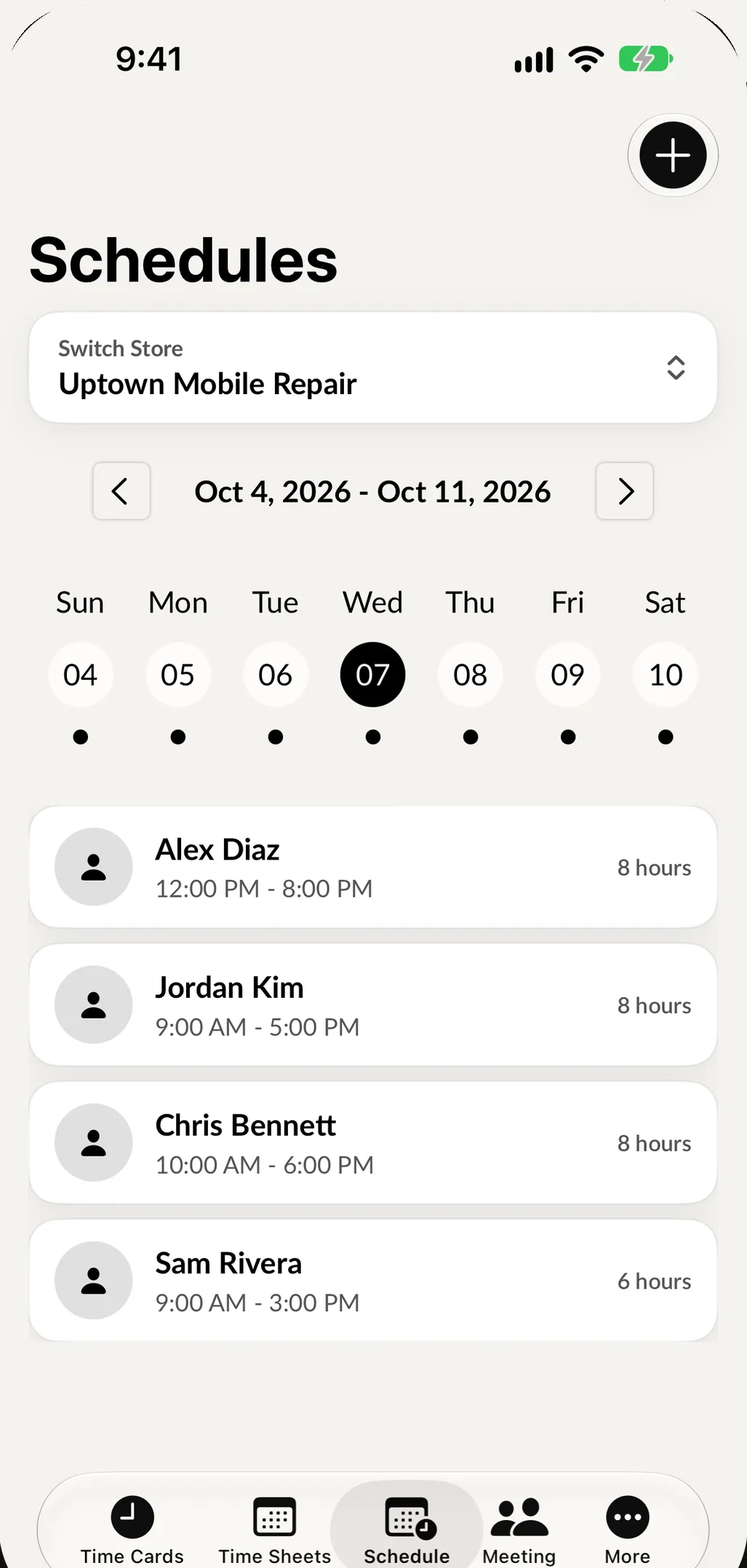
What the employee scheduling app does
Scheduling in Employee Manager is made for a handful of people across one or a few locations, where the owner or manager writes the schedule.
-
A weekly schedule per person
Create a schedule for each employee and add the times they work. Tap Add more times to add another shift.
-
Reuse last week
Most weeks look like the week before. Tap Use Previous Week Schedule to start from last week's shifts, then change only what is different.
-
On their own phone
Employees open the Schedule tab in Employee Manager on iPhone or Android and see their shifts, always up to date.
-
Update or delete anytime
Someone calls out or a shift moves. Open their schedule, change the times and tap Update Schedule, or delete it with a confirmation.
-
Schedules by location
Running more than one shop? Switch store on the Schedules screen to plan each location on its own.
Plan shifts around your busy hours.
Your SpotsPOS home screen shows Popular Times, your busiest hours of the week based on your shop's own activity. Use it to decide when you need two people at the counter and when one is enough.
- Busiest hours come from your shop, not an industry average
- Schedule the extra person for the rush, not the whole day
- Compare the plan with actual hours on the timesheets
Build next week's schedule in a few minutes
-
Open Schedules
From Employee Manager, open Schedules. If you have several locations, switch to the store you are planning.
-
Start from last week
Create a new schedule for an employee and tap Use Previous Week Schedule. If there is no schedule from last week for that person, the app tells you so and you add the times by hand.
-
Adjust the times
Change the shifts that are different this week and tap Add more times for any extra shift.
-
Submit
Tap Submit Schedule. Your employee sees it in the Schedule tab on their phone, next to their time clock.
Why use an employee scheduling app instead of a group chat
Most small shops start with a schedule written on paper, photographed and sent to a group chat. It works until someone scrolls past the latest version, or a shift changes on Wednesday and half the team is still looking at Monday's photo.
An employee scheduling app keeps one current schedule for each person. When you change it, the copy on their phone is the changed one. There is no "which version is right?" because there is only one.
A typical scheduling week
Friday afternoon. You open Schedules and start next week. For three of your four employees nothing changes, so you tap Use Previous Week Schedule and submit. Your newest hire is moving from mornings to afternoons, so you start from last week, edit the times and submit.
Tuesday. Someone asks to leave early Thursday for a family thing. You open their schedule, change Thursday's end time and tap Update Schedule. They see it the next time they open the app.
Thursday. At the end of the shift, they clock out on the time clock, and the hours they actually worked land on their timesheet. You can see the plan and what really happened side by side.
Built into the same app as the time clock
Scheduling is not a separate subscription or a separate login. The Schedule tab sits next to Time Card, Time Sheet and Meetings in Employee Manager, so employees find it where they already clock in. Need to bring the team together? Set up a meeting or post a task on the message board with team communication.
Shift schedules, not customer appointments
This page is about scheduling your staff. If you are looking for customers booking time with your shop, that is appointments in SpotsPOS Repair, a separate feature with its own calendar.
Scheduling questions owners ask
What is the easiest way to make a work schedule for a small business?
Start from what you had last week. In Employee Manager you tap Use Previous Week Schedule for each employee, change only the shifts that are different and submit. For a small team that takes a few minutes.
Can employees see their schedule on their phone?
Yes. Employees see their shifts in the Schedule tab of the Employee Manager app on iPhone or Android, and it always shows the latest version.
Can I schedule employees at more than one location?
Yes. Schedules are kept per store, and you switch store at the top of the Schedules screen to plan each location.
How do I change a shift after the schedule is posted?
Open the employee's schedule, edit the times and tap Update Schedule. If the shift is no longer needed, delete the schedule and confirm.
How much does the scheduling app cost?
Scheduling is part of SpotsPOS Employee Manager, included with the SpotsPOS Pro plan at $89.99 a month for up to 10 employees, with a 14 day free trial. See pricing for what Pro includes.
Post next week's schedule tonight.
Start a trial of SpotsPOS Pro and put the schedule on everyone's phone.
Included with SpotsPOS Pro. Free for 14 days.