
SpotsPOS Employee Manager
Team communication that lives where your team clocks in.
SpotsPOS Employee Manager puts team meetings and a message board in the same app your employees open every shift. Announcements and tasks stop getting lost in a group chat.
Free for 14 days. No credit card needed.
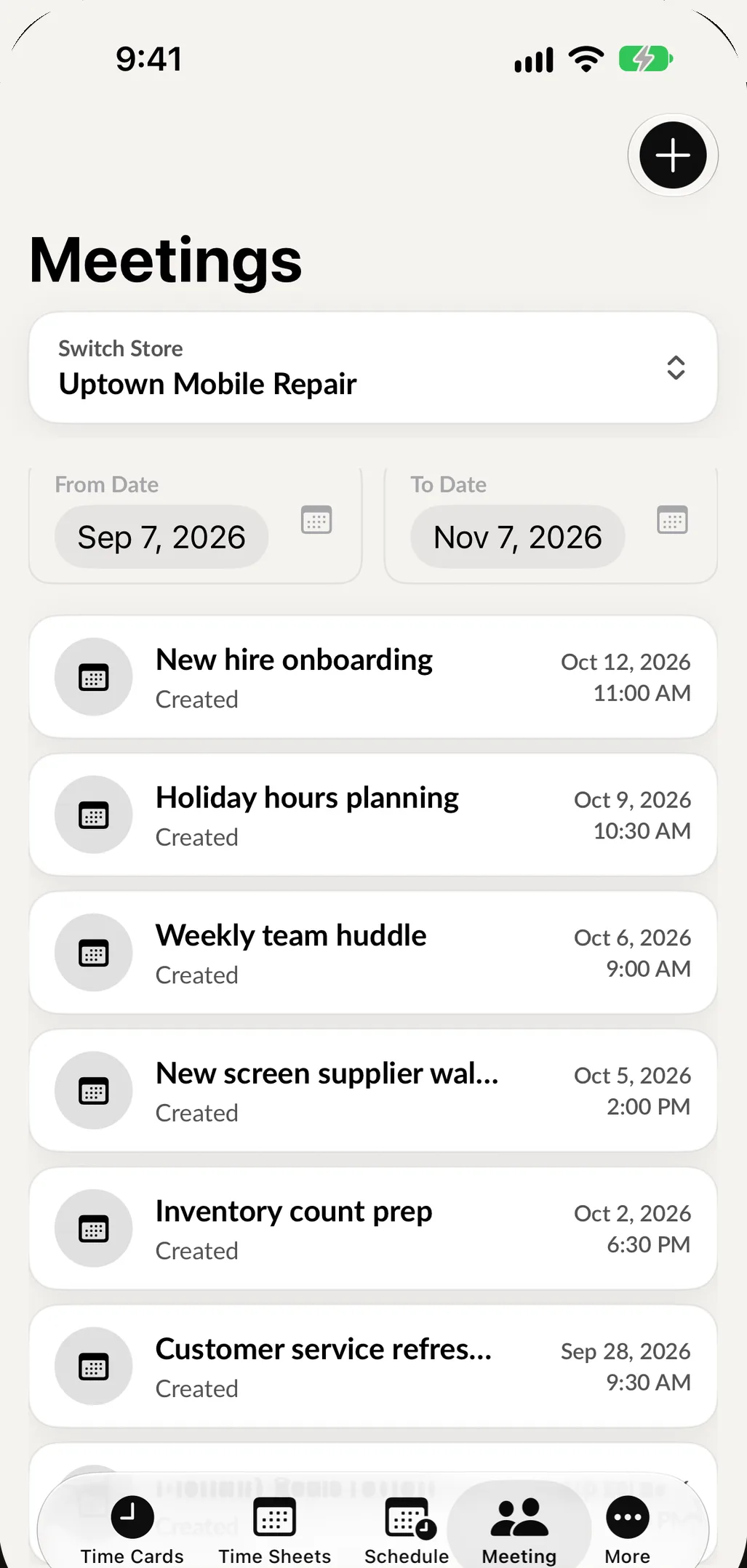
Two simple tools for team communication
Small shops do not need another chat app. They need a reliable place for the things that matter: when the team is meeting, and what needs to get done.
-
Team meetings
Create a meeting with a subject and a date, pick the store and add participants. Each person sees it in the Meetings tab on their phone.
-
Reschedule or cancel
Plans change. Reschedule a meeting to a new date or cancel it, and the people invited see the change instead of showing up to an empty room.
-
Manage who attends
Add or remove participants from a meeting at any time, so the right people are on it and nobody else is.
-
Message board
Post announcements and tasks for the team in one place everyone actually checks, right inside the app they use to clock in.
-
Tasks with a date
Create a message board task with a message and a scheduled date. You can add one for a specific employee straight from their profile.
-
Send a message
Need to reach one person directly? Tap Send Message on their profile to email them from your device's mail app.
Meetings that people actually show up to.
A meeting in Employee Manager is not a text that scrolls away. It has a date, a subject and a list of participants, and it sits in its own tab until it happens.
- Pick the store, the participants, the subject and the date
- Reschedule it, or cancel it with a confirmation
- Notes stay with the meeting
- Delete a meeting you no longer need
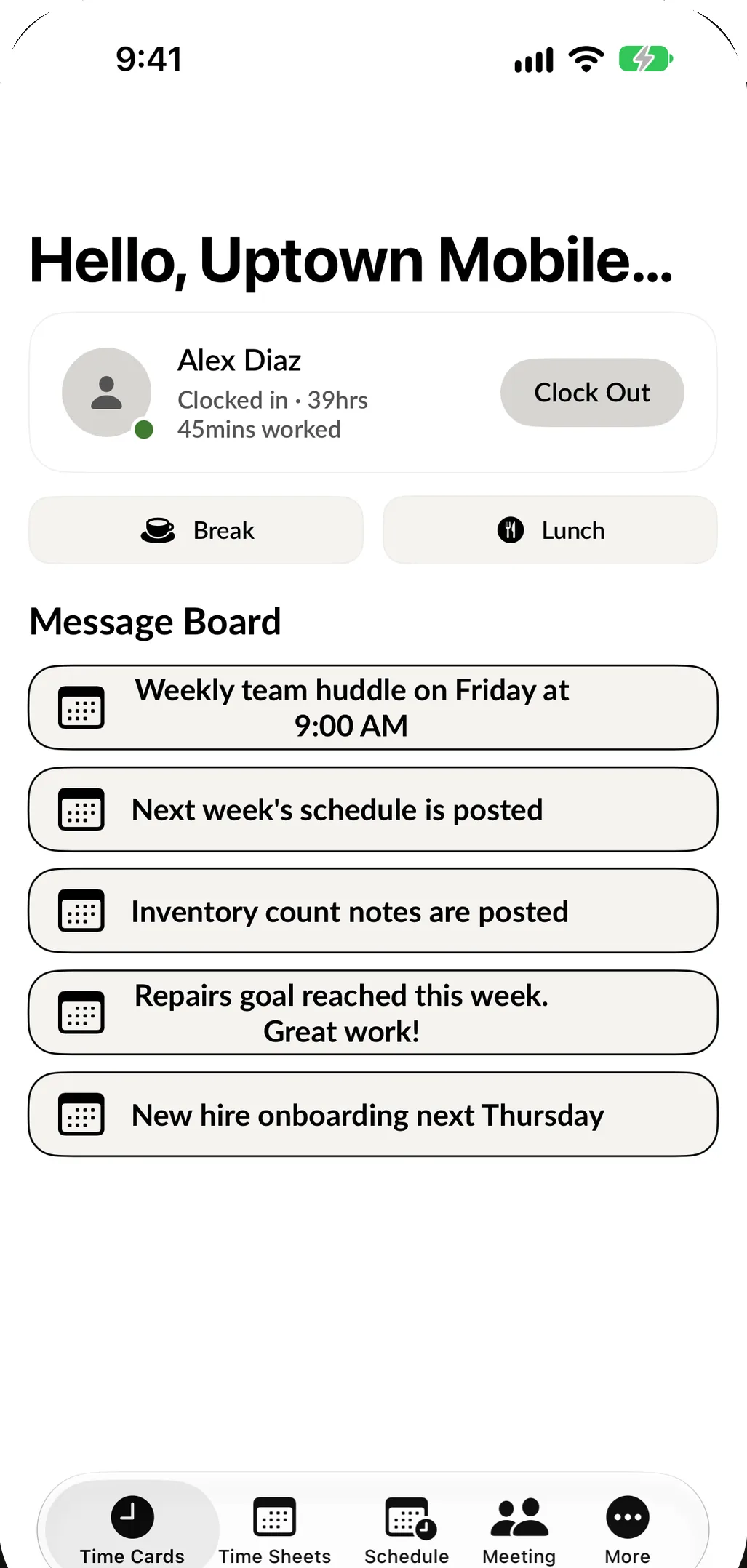
How team communication works day to day
-
Post the week's tasks
On Monday, add message board tasks for the week: restock the cases wall on Tuesday, deep clean the bench on Friday. Each one has a scheduled date.
-
Assign one to a person
From an employee's profile, tap Add Message Board Task to give a task to that person.
-
Call a team meeting
Create a meeting, add the participants and set the date. Everyone invited sees it in the Meetings tab.
-
Adjust when plans change
Reschedule the meeting, change who attends or cancel it. The team sees the update in the app.
Why a team communication app beats a group chat
Group chats are good for quick jokes and bad for anything you need people to remember. The Saturday shift change gets buried under forty messages, and a new hire who joined last month never saw the announcement about the new return policy.
A team communication app with a fixed home solves that. In SpotsPOS Employee Manager, meetings live in the Meetings tab and tasks live on the message board. Both are in the app your team already opens every shift to clock in, so nobody has to install or check one more thing.
What belongs on the message board
Think of the message board as the corkboard in the back room, except everyone can see it from their phone.
- Announcements: new hours for the holiday weekend, a price change, a reminder about the dress code.
- Tasks with a date: count the accessory wall on Thursday, follow up on a supplier order on the 15th.
- Tasks for one person: add a task from that employee's profile so it is clearly theirs.
Running a better team meeting
Small shops often skip meetings because getting everyone together is a hassle. With Employee Manager, you pick the store, add the participants, write a subject and choose the date. If a big repair comes in and you need to move the meeting, reschedule it from the meeting details. If it is no longer needed, cancel it. Notes are kept with the meeting, so you can look back at what was decided.
For owners with more than one shop
Meetings are created per store. Switch store when you create a meeting and invite the people from that location. This works well with schedules by location when you manage several shops.
Part of Employee Manager
Team communication comes with SpotsPOS Employee Manager, along with the time clock, timesheets and scheduling. It is all one app on iPhone and Android, in English or Spanish.
Team communication questions owners ask
What is the best way to communicate with employees in a small business?
Keep important things in one place everyone already opens. In SpotsPOS Employee Manager, meetings and the message board sit in the same app your team uses to clock in, so announcements and tasks are not lost in a group chat.
How do I schedule a team meeting with my employees?
Open Meetings, tap to create a meeting, choose the store, add the participants, write a subject and pick the date. Each participant sees it in the Meetings tab on their phone, and you can reschedule or cancel it later.
Can I assign a task to one employee?
Yes. Open the employee's profile and tap Add Message Board Task. Write the message, choose a scheduled date and submit.
Does it work on Android phones?
Yes. Employee Manager is free to download on Google Play and the App Store, so your whole team can use it whatever phone they have.
Is team communication included in my plan?
Meetings and the message board are part of SpotsPOS Employee Manager, which is included with the SpotsPOS Pro plan. See pricing for what each plan includes.
Give your team one place to check.
Start a trial of SpotsPOS Pro and post your first message board task today.
Included with SpotsPOS Pro. Free for 14 days.