
SpotsPOS Repair
Spots Intelligence: smart repair shop software that knows your shop.
Ask your shop a question and get the number. Say the repair in one sentence and the ticket fills itself in. Spots Intelligence works from your own repairs, sales and inventory.
Free for 14 days. No credit card needed.
Where Spots Intelligence shows up
It is not another screen to learn. It sits inside the screens you already use.
-
Ask your shop
Type a question about repairs, sales, inventory or customers. Get the number, the trend and the list behind it.
-
Suggested parts
Choose the device and the problem, and see the parts that job usually needs, with price and stock. Add them in a tap.
-
Smart Quick Repairs
One-tap repair shortcuts built from the repairs your shop does most, with your usual pricing.
-
Recommended products
At checkout, in-stock items that tend to sell with what is already on the sale, ready to add.
-
Describe the repair
Say or type the job the way you would tell a coworker. The device, repair, timing and priority are filled in for you.
-
Pickup reminders
See which repairs have waited too long for pickup and get a draft text for each customer, ready to check and send.
What smart repair shop software should actually do
A repair counter needs the right part on the ticket, the right price for a job you have done a hundred times, and a quick answer when the owner asks how the week is going. Spots Intelligence does those small jobs, so your team spends less time typing and searching.
Ask your shop, in plain words
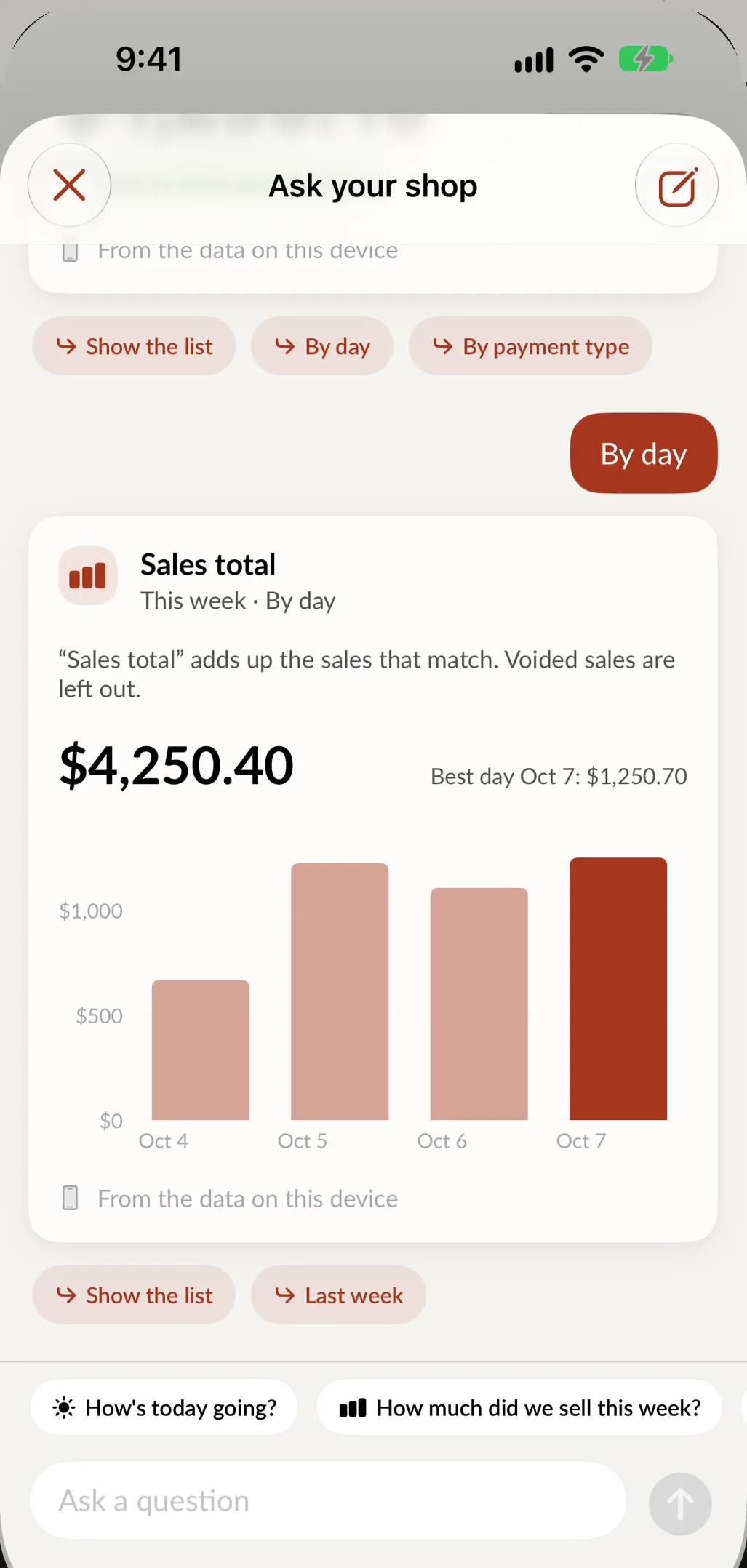
Type "How's today going?", "Which repairs are ready for pickup?" or "What's running low?" and you get the answer, a short sentence saying what it shows, and the list behind it. Follow-up buttons take you further, like sales by hour, by payment type or by technician.
On supported iPhones and iPads, the answer is worked out on the device itself, from the data synced to it. Nothing leaves it. Answers respect each person's role: an employee who cannot see sales totals is offered other questions instead, only admins and store admins see inventory costs, and only admins can compare employees.
Ask your shop knows the limits of what it holds. Questions about profit or older history point you to the full reports in Sales and Reports, which go further back.
Faster check-in
Describe the repair
At intake, tap Describe the repair and say it the way you would to a coworker: "iPhone 13 Pro, cracked screen, needs it tonight." Speak or type, in English or Spanish. SpotsPOS reads it and fills in the device, the repair type, the timing, the priority and a note. If something is missing, it takes you to the step where you pick it, with the list already narrowed. You check it all on the next screen before the ticket is created. More on intake in repair tracking.
Suggested parts and Smart Quick Repairs
Once the device and problem are set, Suggested Parts lists the parts most likely to be used on that repair, with price and stock, so the technician adds them without searching. Smart Quick Repairs builds one-tap shortcuts from the repairs your shop commonly does, so the screen replacement you do every day is a single tap with the right price.
Hints from your history
While you build a ticket, SpotsPOS can tell you what you usually charge for that job and the range from earlier repairs. It also notices when the device was here before, when the customer is returning, or when they already have an open repair, and reminds you to check the warranty. These hints come from repairs on the device and are suggestions only.
Ask about a single repair
On a repair's page you can ask Spots Intelligence a question about that job and get relevant information and recommendations. Treat the answer as a second opinion and check it before you act on it.
Selling a little more at checkout
Recommended Products appears at checkout. Spots Intelligence suggests in-stock products that have a pattern of selling well with the items on the sale, with prices and an add button.
Keeping the counter clear
Attention cards point at what needs you. "Waiting for pickup" lists repairs that have been ready for more than a few days. Tap Draft text and a pickup reminder is written on the device for that customer. Review it, then copy or send it. "Reorder soon" tells you how many items are at or below their low-stock level and roughly what reordering will cost. Snooze either card until next week if now is not the time.
Suggested notes help with customer updates too. For the repair's status you get a ready sentence, like "waiting on a part, work resumes when it arrives", to review before saving. Customers can see these notes, so you always check them first.
At closing time, the Register recap shows sales since the register opened compared with the same hours last week, top sellers and sales by employee.
A check-in with Spots Intelligence
-
Describe it
Tap Describe the repair and say the device, the problem and when the customer needs it.
-
Check what was filled in
Review the device, repair type, timing and priority. Tap Continue to go to the next step that needs you.
-
Add the suggested parts
Suggested Parts shows the parts that job usually takes, with price and stock. Add them in a tap.
-
Confirm the price
A hint shows what you usually charge for this repair, so the quote matches your past work.
Your data stays your own
Ask your shop answers from the data on your iPhone or iPad, and pickup reminders are written on the device. You can turn every Spots Intelligence feature off with one setting.
- Answers worked out on supported devices
- Roles decide who sees sales and costs
- One switch in Settings turns it all off
Questions about Spots Intelligence
What is Spots Intelligence?
Spots Intelligence is the set of smart features built into SpotsPOS: Ask your shop, suggested parts, Smart Quick Repairs, recommended products, Describe the repair, pickup reminders and the register recap. It works from your own shop's repairs, sales and inventory.
Does my shop's data leave the device when I ask a question?
No. On supported iPhones and iPads, Ask your shop works out the answer on the device from the data synced to it, and nothing leaves it. Pickup reminder drafts are written on the device as well.
Can I check in a repair by voice?
Yes. Tap Describe the repair and speak, or type if you prefer. SpotsPOS fills in the device, repair type, timing and priority, and you check everything before the ticket is created.
How does SpotsPOS suggest parts for a repair?
When you choose the device and the problem, Suggested Parts lists the parts most likely to be used on that repair, with price and stock. You add the ones you want; nothing is added on its own.
Which plans include Spots Intelligence?
Spots Intelligence is included from the Essential plan. See pricing for what each plan includes.
Can I turn it off?
Yes. One setting turns off every Spots Intelligence feature across the app, and you can turn it back on at any time.
Let your shop answer its own questions.
Try SpotsPOS Repair free for 14 days and ask your first question today.
Free for 14 days. No credit card needed.