
SpotsPOS Repair
The iPad POS built for repair shops.
Most iPad POS apps were made for coffee shops. SpotsPOS Repair is a native iPad app made for the counter and the bench: check a device in, have the customer sign on the screen, follow every job on the Repair Board and ring up the parts and labor that are already on the ticket.
Free for 14 days. No credit card needed.
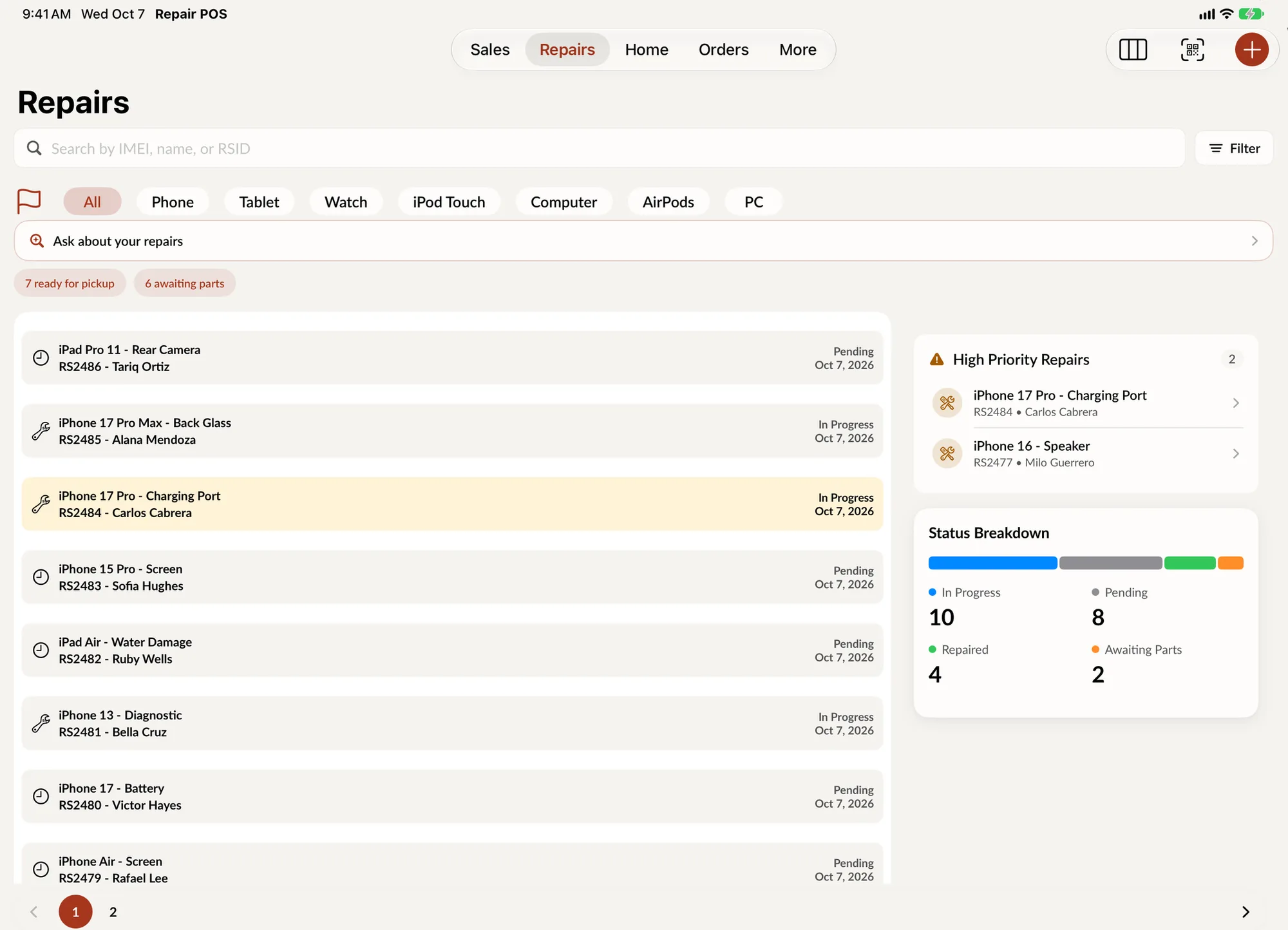
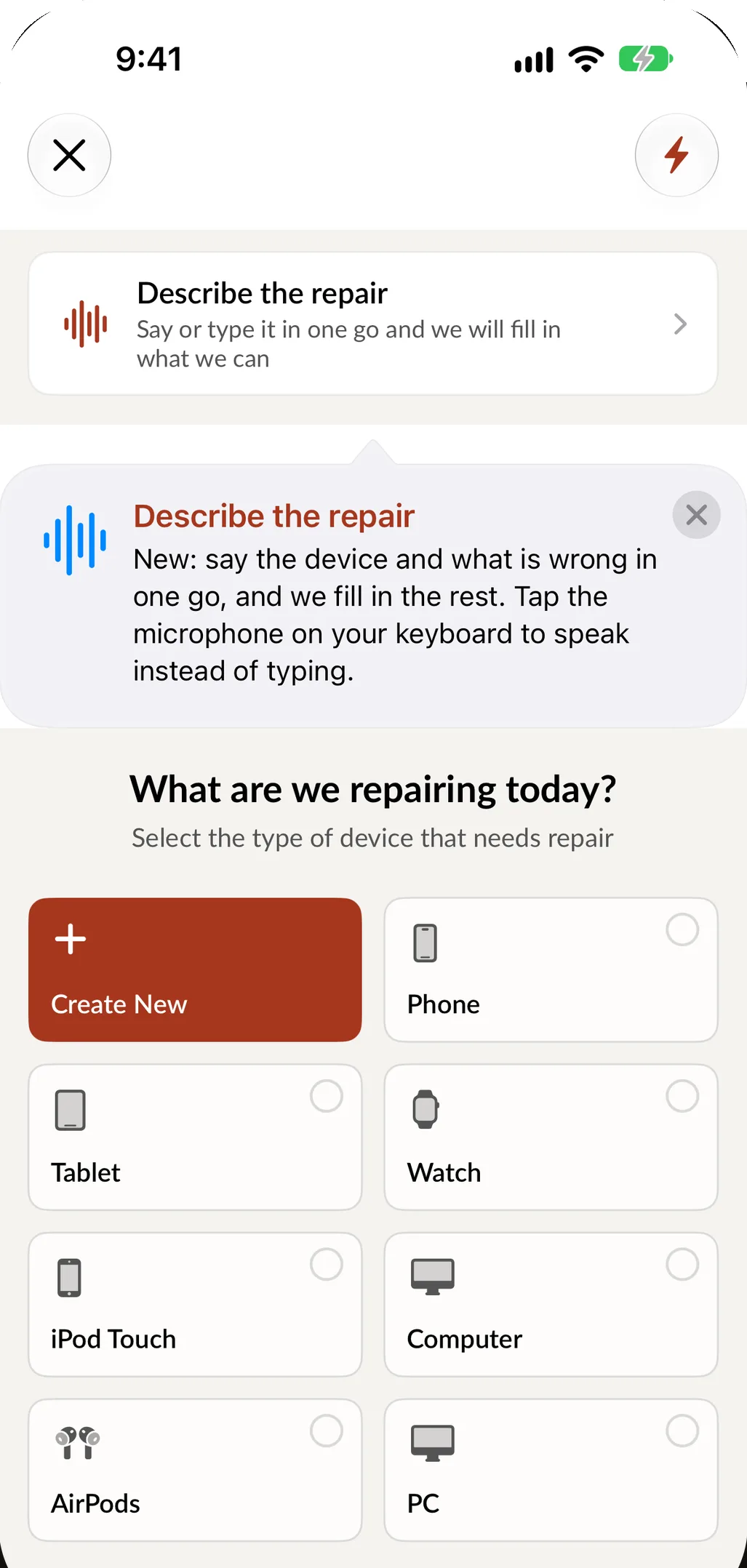
What an iPad does for a repair counter
The iPad is the right size for a counter: big enough for the customer to read and sign, small enough to turn toward them or carry to the bench. These are the pieces of SpotsPOS Repair built around it.
-
Signatures on the screen
Turn the iPad around and the customer signs your terms on the screen. They can draw their unlock pattern on it too, so it is saved with the ticket.
-
The whole bench on one screen
The Repair Board shows every open repair as a card in the column of its status. Drag a card to update the repair.
-
Side by side layouts
On iPad, SpotsPOS uses side by side layouts, so more of your shop fits on one screen than on a phone.
-
The camera is a scanner
Scan an IMEI or serial barcode with the iPad camera to fill in a ticket or find a repair. Add up to 10 photos of the device at check in.
-
Printers that every device shares
Print receipts and repair tickets on Epson and Star printers over Ethernet, so every iPad and iPhone in the shop can print. Add barcode labels for devices and parts.
-
One iPad, the whole team
Everyone signs in with their own PIN and sees only what their role allows, so a shared counter iPad still knows who did what.
Start with the iPad you have.
You do not need special hardware to try SpotsPOS. An iPad or an iPhone is enough, and receipts can go out by text or email until you add a printer. When the counter needs more, add a Bluetooth barcode scanner that pairs like a keyboard, a cash drawer that opens from the receipt printer on a cash sale, and a stand that turns the iPad toward the customer. See what we recommend on the hardware page.
- No required stand or terminal to get started
- Bluetooth scanners and keyboards pair in Settings
- Receipts by text, email or printer
A repair on the counter iPad, from check in to payment
-
Check it in
Pick the device type, brand, model and problem in four taps, or say the job in one sentence and SpotsPOS fills in the form.
-
Document it
Scan the IMEI or serial, take photos, tick what works and save the passcode or pattern. The customer signs on the screen.
-
Work it on the board
The job lands on the Repair Board. Technicians drag it from Pending to In Progress, log their time and move it on when it is done.
-
Ring it up
Parts and labor are already on the ticket. Take off the deposit, take cash or card at the counter, and send the receipt by text, email or printer.
What to look for in an iPad POS for a repair shop
A general iPad POS sells items. A repair shop also has to take in a device that belongs to someone else, keep track of it for days and hand it back. Before you choose, check that the iPad app does these things, not only the register:
- Repair tickets that start on the iPad. Device, problem, passcode, photos and the customer's signature should all be captured at the counter, not typed in later on a computer.
- Parts linked to repairs. When a repair is sold, the screen or battery should leave inventory on its own, and low stock should show up before you run out. More in inventory management.
- A view of the bench. A board of open repairs by status tells you what is waiting on parts and what is ready for pickup.
- Messages to the customer. Telling someone their device is ready should be one tap from the ticket. See customer notifications.
- The same shop on iPhone and on a computer. Technicians update jobs from an iPhone at the bench, and the office works in the Web Portal, all on the same repairs, sales and inventory.
- A plan for when the internet drops. In SpotsPOS, repairs, customers, sales, orders and inventory saved on the device stay readable offline, and changes wait for the connection. Read how offline mode works.
- Your customers' language. SpotsPOS works fully in English and Spanish, including describing a repair out loud.
iPhone or iPad?
Everything in SpotsPOS Repair works on iPhone. The iPad adds the Repair Board and side by side layouts, and its screen is easier for a customer to read and sign. Many shops keep an iPad on the counter and an iPhone in each technician's pocket, on the same account.
Questions about using an iPad as a repair shop POS
Can I run my repair shop POS on an iPad?
Yes. SpotsPOS Repair is a native iPad and iPhone app. Check devices in, track repairs on the Repair Board, sell parts and accessories and take payment at the counter, all from the iPad.
What hardware do I need with the iPad?
None to start. Receipts can go by text or email. When you are ready, add an Epson or Star receipt printer, a Bluetooth barcode scanner, a cash drawer that connects to the printer and a stand. See the hardware page.
Can several employees share one iPad?
Yes. Each employee signs in with their own PIN and sees only what their role allows. See employee permissions.
Does it work on iPhone too?
Yes. Everything works on iPhone. The iPad adds the Repair Board and side by side layouts. You can also manage the shop from any computer through the Web Portal.
Which iPads are supported?
SpotsPOS runs on current iPad and iPhone models. Check the App Store listing for the minimum iPadOS version.
How much does it cost?
Plans start at $45 a month for one location, and the 14 day free trial does not ask for a credit card. See pricing.
Put your counter on an iPad.
Start a 14 day free trial and check in your first repair today.
Free for 14 days. No credit card needed.