
Running a Repair Business on the Side: The Software You Need
Starting a repair side hustle? The software you need on day one, what can wait, what it costs and when to upgrade, from tickets and payments to customer updates.
To run a repair business on the side, you need less software than you think: one app on your phone that writes a repair ticket, records the customer's signature, tracks the few parts you stock, takes the payment and tells the customer when the device is ready. Skip anything that needs a computer at a desk, a contract or a setup project. Start with one person's plan, keep records the IRS would accept from day one, and upgrade only when you hire help or open a counter.
What a side repair business actually looks like
Most side repair businesses start the same way. You fix phones, consoles or laptops for friends, word gets around, and suddenly there are three devices on your kitchen table and a group chat full of "is mine ready?" You work evenings and weekends, maybe from home, a booth or a corner of someone else's shop.
That shapes what you need from software:
- It has to run on your phone. You are not at a desk. You check devices in at a coffee shop, on a porch or at your day job's parking lot.
- It has to be fast. A check-in that takes ten minutes is a check-in you skip.
- It has to be cheap and month to month. You are testing whether this business works.
- It has to make you look like a real shop. A printed or texted ticket and receipt make a customer trust a stranger with a $1,000 phone.
The software you need on day one
1. Repair tickets
Every device gets a ticket: customer, device, IMEI or serial, the problem, the price and a status. This is the one thing a spreadsheet or notes app does badly, because you cannot search it by IMEI, it does not tell you what is waiting on a part, and it does not hold a signature.
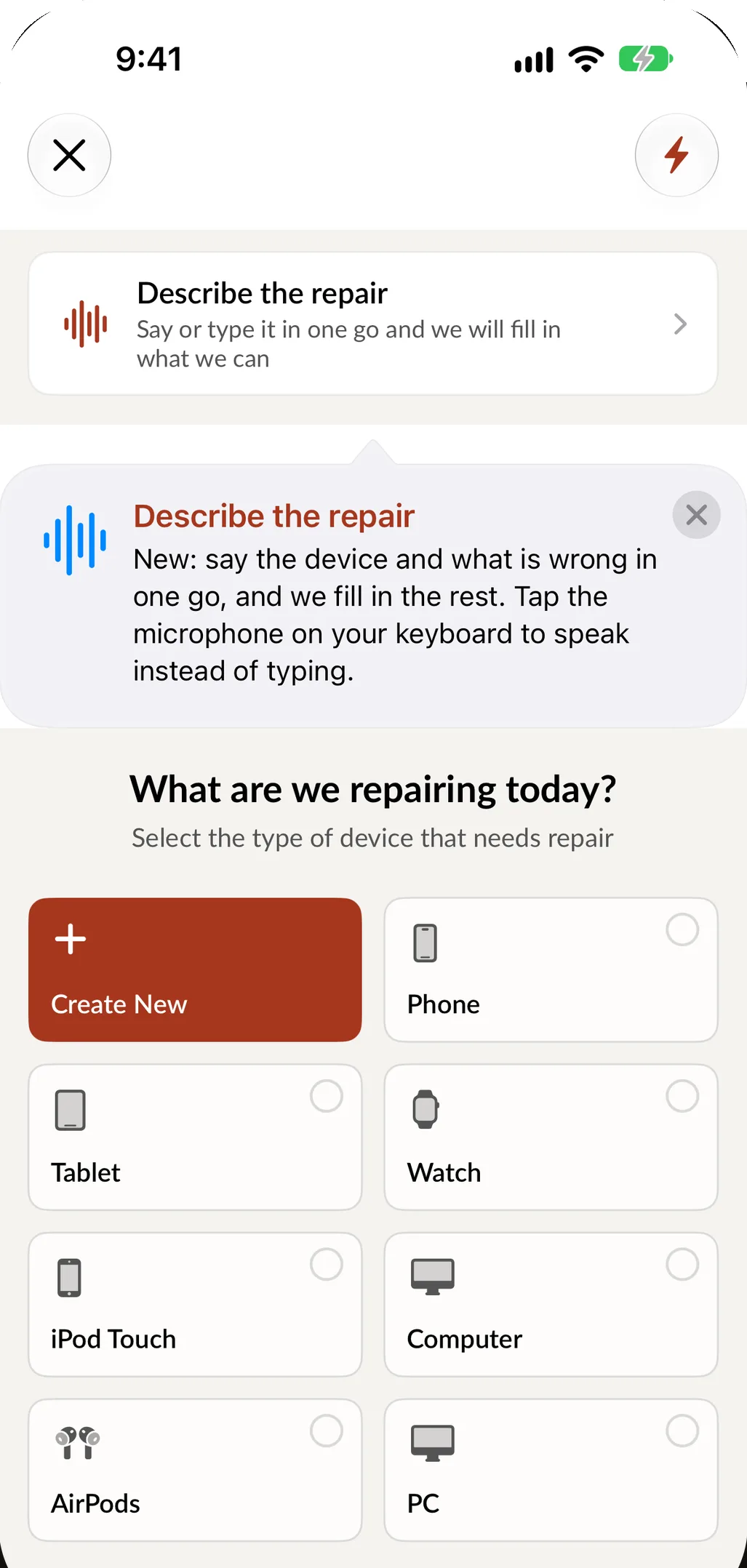
In SpotsPOS Repair, you create a repair on your iPhone by picking the device type, brand, model and service, or you tap Describe the repair and say it in one sentence. Your most common jobs become Quick Repairs that start in one tap. If you fix things that are not phones, tap Create New and add your own device types.
2. A signature and photos at check-in
When you work from home, the customer's trust is all you have, and a signed agreement protects both of you. Have the customer accept your terms (data, warranty, what happens if they do not pick up) and sign on the screen. Take photos of the device before you open it, and save the passcode on the ticket so you can test it without texting them at 11 PM. Our repair ticket checklist lists what to capture, and our guide to preventing chargebacks explains why it matters.
3. Parts you can find
You might only stock ten screens and a box of batteries. Track them anyway. When a part goes on a ticket, it should come off your count, so you know what to order before the next weekend. Inventory and parts ordering are part of every SpotsPOS Repair plan, including Starter.
4. A way to take payment and send a receipt
Take payment from the ticket, so the parts and labor are already on the sale, and send the receipt by email or text. Cash, card or a deposit up front for a special-order part all go on the same record. If you already take cards through Square, SpotsPOS can send the sale to Square to take the payment (integrations, from the Essential plan).
5. Customer updates without a group chat
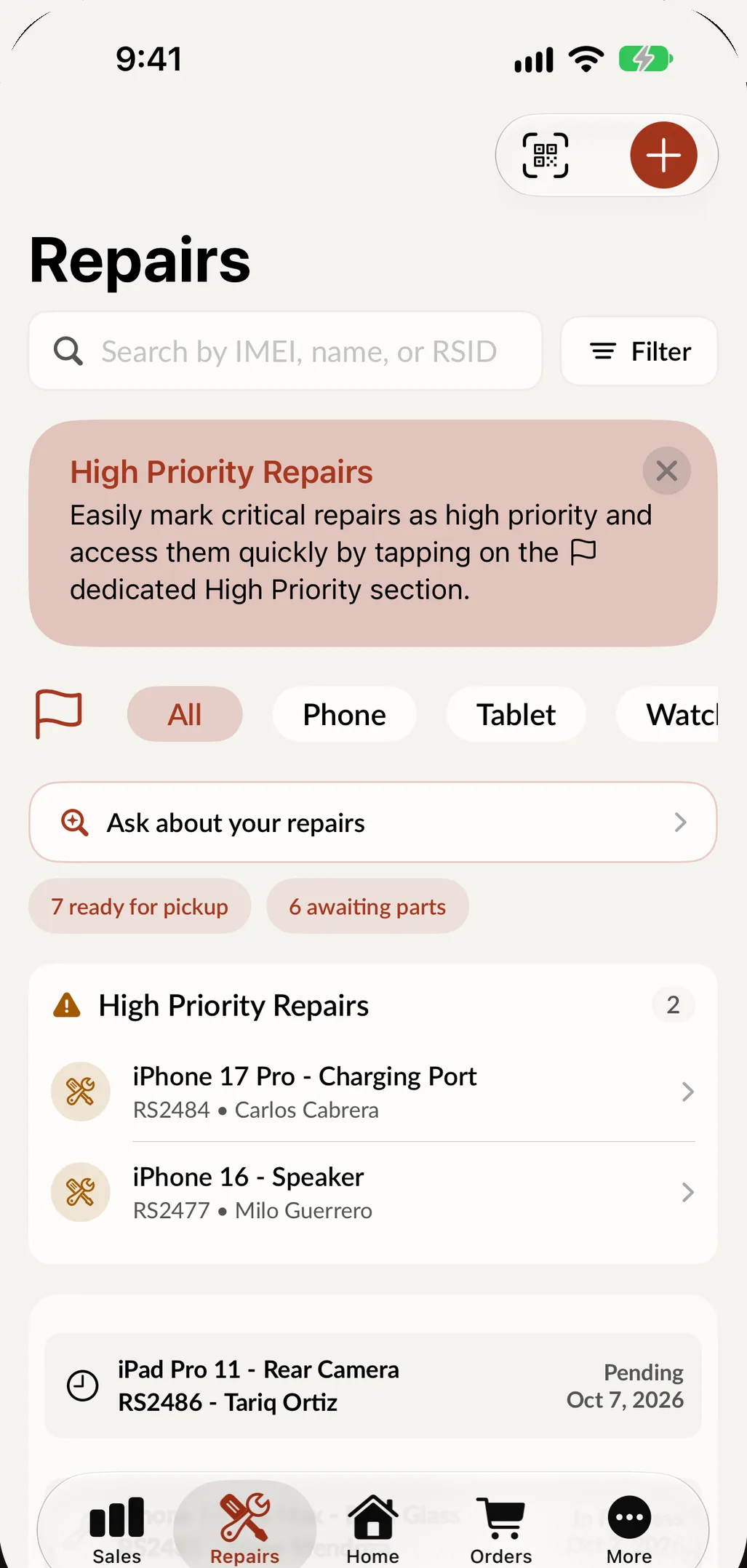
"Is it ready?" texts eat your evenings. A status on every ticket and one tap to tell the customer it is done fixes that. In SpotsPOS, Notify Customer tells them the device is ready, and automated emails are included in every plan. Texts go out through your own Twilio number from the Essential plan. See customer notifications.
What can wait
Plenty of features matter later and not now:
- Employee scheduling and time clocks. You are the only employee.
- Multi-store and inventory transfers. One location is the whole business.
- Purchase orders and advanced inventory. Ordering from one supplier from your phone is enough at first.
- Hardware. A receipt printer, barcode labels and a cash drawer can wait until you have a counter. Email and text receipts cost nothing. When you are ready, see hardware.
What it costs
Count the software as a business expense, like your tools and parts. For a solo repair business:
| What to expect | |
|---|---|
| SpotsPOS Repair Starter | $45 a month, 1 location, 1 employee: repair tickets, point of sale, inventory and parts ordering, customer profiles and automated emails |
| Free trial | 14 days, no credit card needed |
| Hardware | Your iPhone or iPad is enough to start |
| Contract | None: plans are billed monthly |
The whole price list is on the pricing page. If you are comparing other tools for a one person shop, our guide to the best repair shop software puts six of them side by side.
Keep records like a business from day one
Side income is still income. The IRS says income from a side activity must be reported, and when it decides whether an activity is a hobby or a business, one of the factors it looks at is whether you run it in a businesslike way, with complete and accurate books and records. Talk to a tax professional about your situation, but make their job easy:
- Every sale in one place. Not some in an app and some in your memory.
- Costs next to sales. Parts cost on each repair, so you can see real profit.
- A monthly look. Sales, profit and repairs this month against last month.
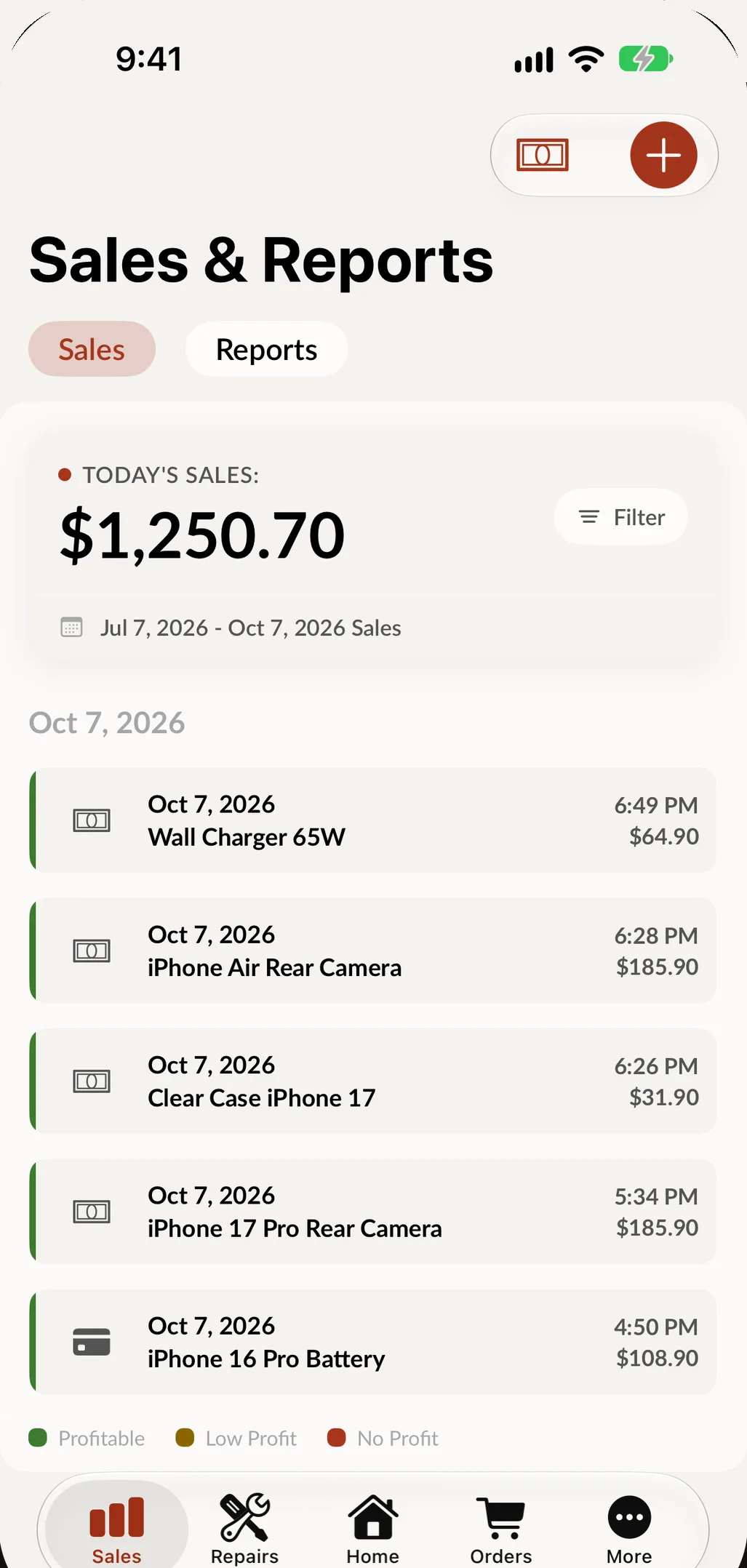
In SpotsPOS, Sales & Reports shows today's sales with each one marked profitable, low profit or no profit, and the Export Tool sends your sales to a spreadsheet for whoever does your taxes. See reports.
When to upgrade
Your software should grow when the business does, not before:
- You hire your first helper. Move to Essential ($74.99 a month, up to 3 employees) for user management, so each person has their own PIN. Essential also adds Spots Intelligence, which suggests parts for each repair and answers questions about your shop.
- You want texts from your own number or Square payments. Integrations come with Essential.
- You open a counter with a small team. Pro ($89.99 a month, up to 10 employees) adds Employee Manager for the time clock and schedules.
- You open a second location. Talk to us about multi-shop.
If you are going full time, our guide on how to start a cell phone repair business covers costs, tools and the rest of the setup.
Checklist: your side repair business software
- One app on your phone for tickets, payments and customer updates.
- A signature and photos on every check-in.
- Parts tracked from the first screen you buy.
- Receipts by email or text.
- Every sale and cost in one place, exportable for taxes.
- Month to month pricing you can cancel.
- An upgrade path for your first employee.
Frequently asked questions
Do I need repair shop software for a side hustle?
If you fix more than a few devices a month, yes. A ticket per device, a signature and a record of every sale protect you from disputes, stop lost parts and make tax time simple. A one person plan costs less than a single screen repair.
Can I run a repair business from my phone?
Yes. SpotsPOS Repair runs on iPhone and iPad, so you can check devices in, track repairs, take payments and send receipts from your phone. Your repairs, customers and inventory stay on screen if the internet drops (offline mode).
How much does repair shop software cost for one person?
SpotsPOS Repair Starter is $45 a month for one location and one employee, with a 14 day free trial that does not ask for a credit card.
What do I need to start a phone repair side business?
Tools, a small stock of common parts, a place to work, and a way to write tickets, take payments and keep records. Check your city and state for business license and sales tax rules before you start charging.
When should I move to a bigger plan?
When you add an employee. The Starter plan covers one person, and Essential covers up to three with their own PINs.
Ready to try it? See the plans, start a 14 day free trial and write your first ticket tonight.