
Black Friday Checklist for Repair Shops and Phone Stores
Get your repair shop ready for Black Friday and Cyber Monday: staff the rush hours, stock up in time, plan your offers and keep repairs moving at the counter.
To get a repair shop ready for Black Friday, plan the week on its own instead of running a normal schedule: compare the same week last year with a normal week, put extra people on the hours your data says are busiest, order your best sellers and repair parts before suppliers slow down, decide your offers now, and keep one person on repair check-ins so the bench never stops. In 2026, Thanksgiving is Thursday, November 26, Black Friday is November 27, Small Business Saturday is November 28 and Cyber Monday is November 30. Below is a checklist you can work through in the next two weeks, with where to find each number in SpotsPOS.
Why Black Friday needs its own plan
A normal week has a shape you already know. Black Friday weekend does not. More people walk in, they come for accessories and gifts as much as for repairs, and they come in the same few hours. A shop that runs its usual schedule ends up with a long line at 5 p.m., a technician pulled off the bench every ten minutes, and the case everyone wanted sold out by noon.
Most of what goes wrong that weekend is decided now: who works, what is on the shelf, and what you are offering. The checklist below is in the order you should do it.
1. Start from last year, not last week
Last week tells you about a normal week. Last year tells you about this one.
- Pull the same week from last year. In SpotsPOS, open last November in your Monthly Sales report, and set a custom range in Repair Reports for Thanksgiving week last year. Then look at a normal week from the same month.
- Compare the two. How many more sales? How many more repairs checked in? Which days were the jump: Friday, Saturday or Monday?
- Write down the multiplier. If last year's Black Friday had about twice the sales of a normal Friday, plan staff and stock for about twice as much, then adjust for how this year is going.
If this is your first holiday season on SpotsPOS, use your best normal Saturday as the floor and plan for more.
2. Staff the hours your data says are busiest
You do not need more people all day. You need them in the hours the line forms.
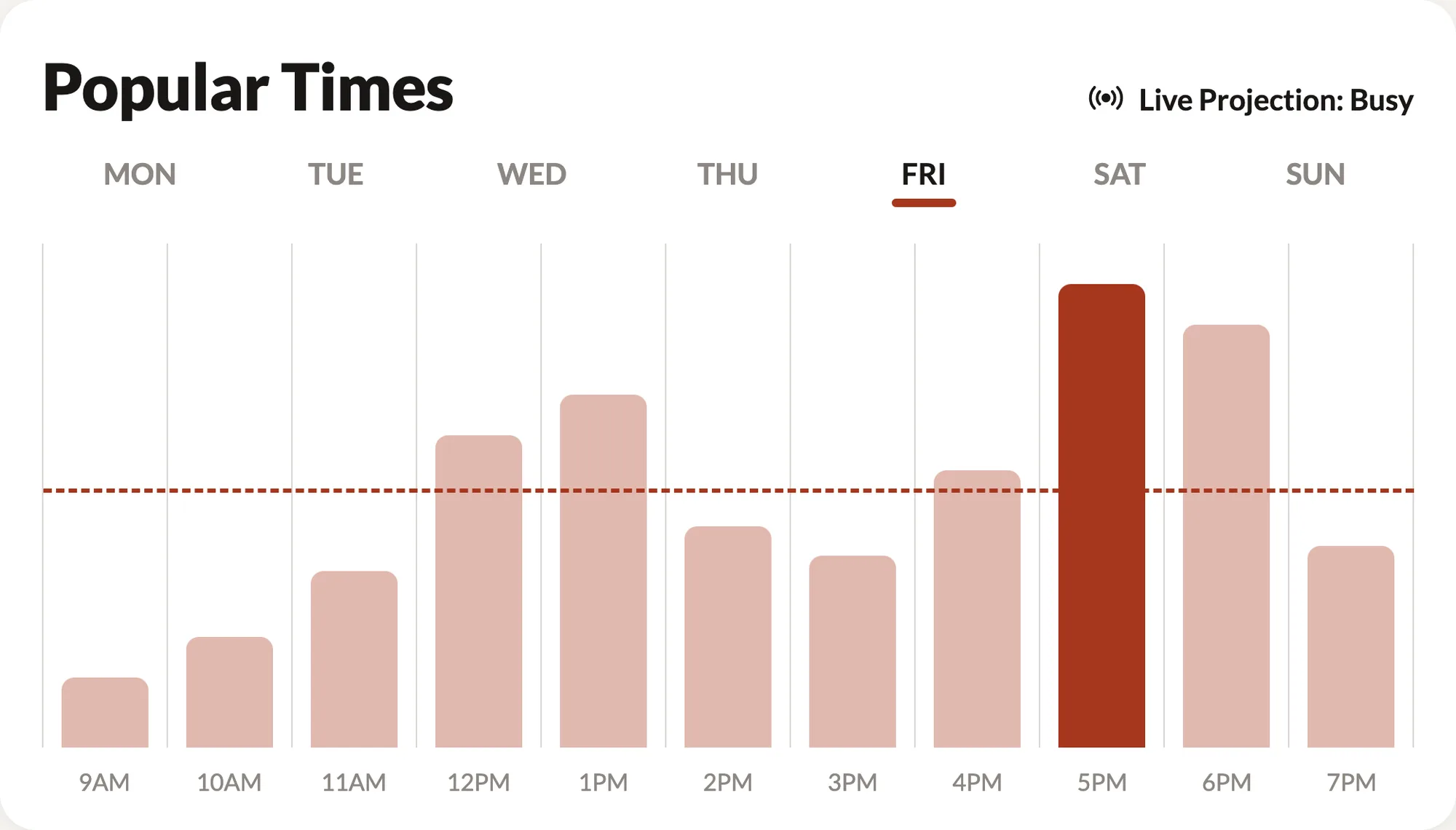
- Use Popular Times for the shape of the day. On the SpotsPOS home screen, Popular Times shows your busiest hours for each day of the week, with your average hour marked. Holiday crowds usually come in the same hours as your normal peaks, just bigger.
- Add a shift, not longer shifts. A fourth person for the busiest six hours does more than stretching three people to twelve hours. Put the extra shift where the bars are tallest.
- Keep a repair person at the counter. Holiday shoppers still drop off cracked screens. Decide ahead who takes check-ins so the technician can keep working.
- Lock time off and publish early. Set a cutoff for holiday time-off requests, and post the Thanksgiving week schedule at least two weeks ahead.
In Employee Manager, add the extra shifts like any other week and post the plan on the Message Board so the whole team sees it. Our guide on scheduling staff around your busiest hours walks through building the shift templates.
3. Stock up in time, especially seasonal items
The worst Black Friday problem is a customer ready to buy something you ran out of on Friday morning.
- Run the Low Stock Items report now. Every item in SpotsPOS can have its own low stock level, and low stock email notifications tell you when an item reaches it. Look at what is already low before the rush, not during it.
- Check what sold last year. Your sales from last year's Black Friday week show which products moved. Seasonal items like cases, screen protectors, chargers, earbuds and gift-ready accessories sell faster this week than any other.
- Order early. Suppliers slow down the same week you do. Place purchase orders for your best sellers and your fastest repair parts (screens, batteries, charging ports) at least a week before Black Friday. In SpotsPOS, purchase orders are created on iPad and received straight into inventory.
- Ask your shop. With Spots Intelligence on a supported iPhone or iPad, ask "What's running low?" and get the list without opening a report.
Low stock reports and purchase orders are included from the Essential plan. See inventory management and purchase orders.
4. Plan your offers before the week starts
An offer decided at the counter on Friday is an offer nobody tracked. Decide them now, write them down and tell the team.
- A repair offer with a limit. For example, a discount on screen repairs for the first 20 customers on Black Friday, or for repairs checked in before noon. A clear limit creates urgency and protects your margin.
- Accessory bundles. A case and screen protector with every repair, or two accessories for a set price, move the seasonal stock you just ordered.
- A different Cyber Monday deal. Give Monday its own offer instead of repeating Friday's, so the people who came Friday have a reason to come back and the people who missed it have a reason to come in. Announce it on your social pages and website over the weekend.
- Small Business Saturday. Many shoppers go out of their way to support local shops that day. Say you are local and independent in your posts and on the door.
- Layaways for gifts. For bigger items like tablets or refurbished phones, a layaway lets a customer reserve a gift and pay over time.
In SpotsPOS, discounts are applied at checkout. After the weekend, the Profit Overview marks every sale as profitable, low profit or no profit, so a discount that went too far stands out. See reports.
5. Keep repairs moving at the counter
The rush is good for accessories and hard on repairs. Protect the bench.
- Check in fast. Have repair terms and the ticket flow ready so a check-in takes a couple of minutes, even with a line.
- Set honest turnaround times. If the bench is backed up, say so at check-in. A customer told "tomorrow at 3" is happier than one told "an hour" who waits four.
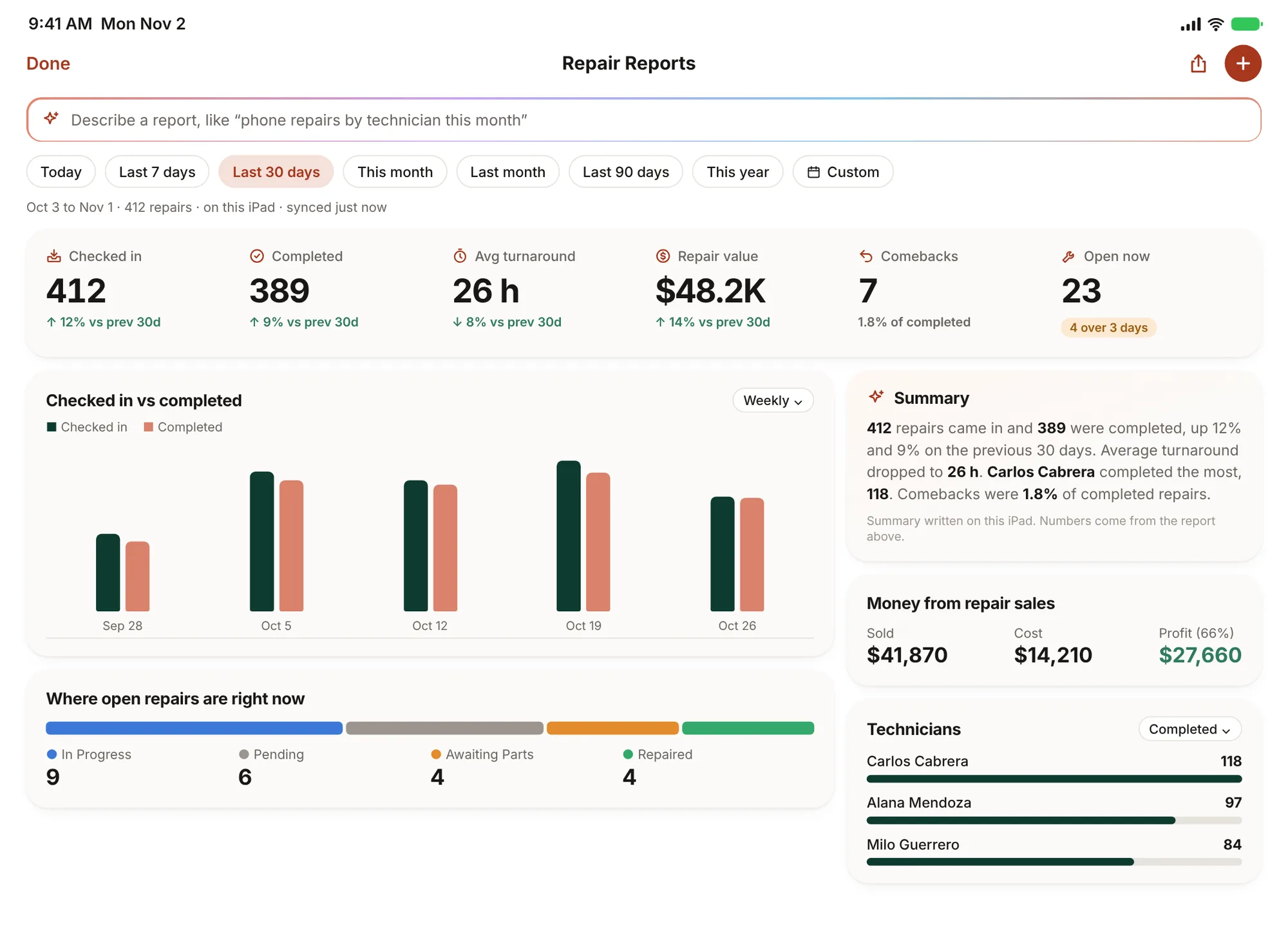
- Watch what is open. Repair Reports shows what came in, what got done and what is still open, by status and by technician, so you can see when the bench falls behind.
- Clear the pickup shelf before the rush. Send reminders for finished repairs the week before, so the shelf has room. Our unclaimed repairs guide has a reminder schedule.
6. After the weekend: measure it
On Tuesday, look at what actually happened while you still remember the weekend.
- Compare the weekend with your plan: sales, repairs checked in and completed, and average turnaround.
- Check which offers sold and whether any went below the margin you wanted.
- Note what ran out and when. That is next year's order list.
- Save the numbers. Next November, this weekend is the "same week last year" you start from.
The repair shop KPIs guide covers the weekly numbers worth checking after any big week.
The checklist
- Compare the same week last year with a normal week and write down the multiplier.
- Find your busiest hours in Popular Times and add a shift there.
- Keep one person on repair check-ins all weekend.
- Set a holiday time-off cutoff and post Thanksgiving week two weeks ahead.
- Run the Low Stock Items report and check what sold last year's Black Friday week.
- Order seasonal accessories and fast-moving repair parts at least a week before.
- Decide your Black Friday, Small Business Saturday and Cyber Monday offers, with limits.
- Send pickup reminders so the shelf is clear before the rush.
- On Tuesday, compare the weekend with the plan and save the numbers.
Frequently asked questions
When should a repair shop start preparing for Black Friday?
Two to three weeks before. That is enough time to compare last year's numbers, publish the schedule two weeks ahead and get parts and accessories in before suppliers slow down.
What should a phone repair shop stock for Black Friday?
Start from what sold last year that week: usually cases, screen protectors, chargers, cables and earbuds, plus the repair parts you use fastest, like screens and batteries for the most common models. Order them at least a week before.
What is a good Black Friday offer for a repair shop?
A limited repair discount, such as a lower price on screen repairs for the first customers of the day, plus accessory bundles with every repair. Give Cyber Monday its own offer so customers have a reason to come back.
How do I know how many staff I need on Black Friday?
Compare the same week last year with a normal week, then add people around the hours your normal days already peak. In SpotsPOS, Popular Times shows those hours for each day.
Getting ready for the rush with SpotsPOS? Find your busiest hours, run your low stock report and build the schedule in SpotsPOS Repair, SpotsPOS Retail and Employee Manager.