
SpotsPOS Repair
Small engine repair shop software that keeps up with the season.
Mowers that will not start in April, chainsaws that will not idle in October, generators that sat all year. SpotsPOS Repair is small engine repair shop software that checks every machine in by its serial, follows the parts you are waiting on and sells the oil, filters and blades at the same counter.
Free for 14 days. No credit card needed.
What comes through the door each season, handled.
Small engine work is seasonal, parts-heavy and full of machines that look alike. These are the pieces of SpotsPOS Repair a small engine shop leans on.
-
Your own equipment catalog
Create device types like Mower, Trimmer, Chainsaw, Blower and Generator, add the brands and models you service, and name your services: tune-up, carburetor clean, blade sharpening, pull cord.
-
Model and serial on the ticket
Record the model and serial from the equipment tag, or scan its barcode, so the right machine goes back to the right customer. Search repairs by serial or name.
-
Seasonal tune-ups in one tap
Save your tune-up packages as Quick Repairs with the plug, filter, oil and labor already filled in.
-
Parts you have to order
Create an order for the carburetor or part you do not stock, add tracking and follow it from Ordered to Received, or Delayed when it slips.
-
Customers who come back every spring
Every repair stays on the customer's profile, so you can see last year's service on the same machine before you quote.
-
Parts and supplies at the counter
Oil, filters, plugs, line and blades sell from inventory on the same checkout as the repair.
Document the machine before it goes to the back.
A mower arrives with a bagger, a key and a full tank. Note what came in and its condition with photos, tick what works, and keep it on the ticket with the serial. When it is time to pick up, the record answers the questions before they become arguments.
- Up to 10 photos per ticket
- A component checklist per repair type
- The customer signs your terms on the screen
A machine, from drop-off to pickup
-
Check it in
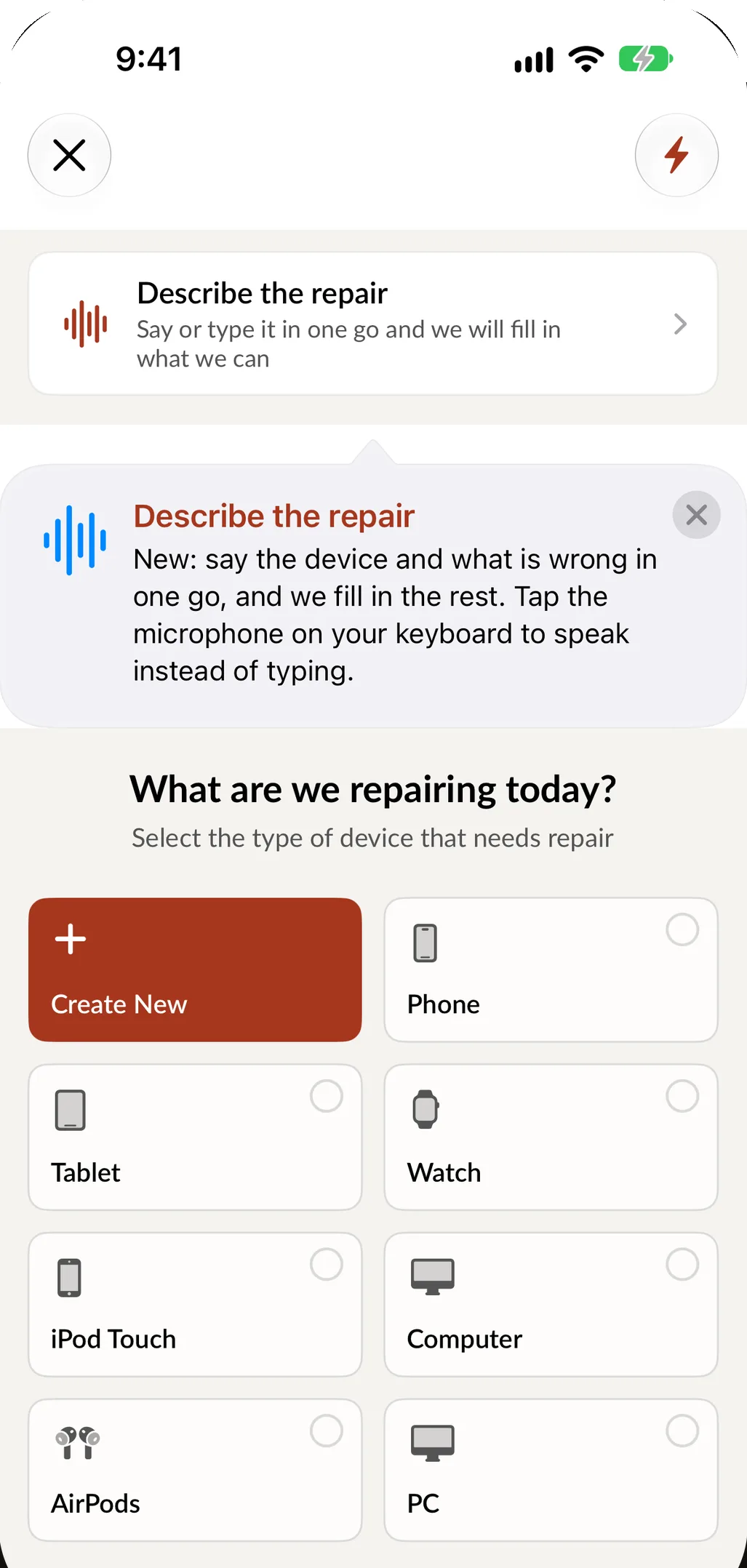
Pick the equipment type, brand, model and service, or say it in one sentence: push mower, will not start after winter, needs a tune-up. SpotsPOS fills in what matches your catalog.
-
Document it
Record the serial, take photos, tick what works, note the attachments and get a signature on your terms, including how long you hold equipment that is not picked up.
-
Diagnose and quote
Write a diagnostic, add parts and labor, print the estimate and take a deposit for special-order parts. The status reads Waiting on customer until they approve.
-
Order and repair
Order what you do not stock and move it to Awaiting Parts. When the part arrives, the technician logs time on the ticket.
-
Test and hand back
Run it, move it to Repaired, notify the customer and set a warranty period. If it is not worth fixing, mark it Non Repairable and tell them first.
Small engine repair shop software, from the first tune-up to the last generator
Your catalog, not a phone catalog
You decide what a device is. Tap Create New to add the equipment you service, then add brands, models and services in your own words. Link the parts each repair type uses, so a tune-up pulls the right plug and filter with the right price and stock.
The seasonal queue
Spring brings mowers and fall brings blowers and chainsaws, all at once. Book drop-offs as appointments and turn each one into a ticket. Mark the commercial landscaper's mower high priority and it sits at the top of the Repairs list. On iPad, the Repair Board shows every machine as a card you drag from status to status.
Parts that take a week
Carburetors and engine parts are often ordered one at a time. Each special order records the part, the customer's price, your cost and whether the machine was left in the shop, with tracking until it arrives. Meanwhile the repair sits in Awaiting Parts, and customer notifications keep the customer informed by text or email.
Machines nobody picks up
Every shop has a corner of equipment that was fixed and never collected. Put your storage terms on the check-in your customer signs, and send a reminder from the ticket when the work is done. The Repairs list shows what is ready for pickup, so the corner gets smaller.
Commercial customers
Landscapers and property managers bring a fleet, not a mower. Mark them as B2B customers, give them a special discount and send an invoice when the jobs are done.
What to look for in small engine repair shop software
| Ask | Why it matters | In SpotsPOS Repair |
|---|---|---|
| Can I build my own equipment catalog? | Mowers and saws are not in a phone database | You create the device types, brands, models and services, and link parts to each repair type |
| Does it record model and serial? | Many machines look the same on the shelf | Serial on the ticket, scanned or typed, and repairs searchable by serial |
| Can I save tune-up packages? | Tune-ups are most of the season | Quick Repairs start a package in one tap |
| How are special-order parts followed? | Engine parts are often ordered one at a time | Orders with the customer's price, your cost, tracking and an Awaiting Parts status |
| Can I invoice commercial customers? | Landscapers pay on account | B2B customers with a special discount and invoices |
| Does it sell parts and supplies? | Oil, filters and blades sell at the counter | Point of sale and inventory in the same app |
SpotsPOS Repair plans start at $45 a month; see pricing.
Questions small engine shops ask
Can I set up mowers, chainsaws and generators in SpotsPOS Repair?
Yes. You create the device types, brands, models and services yourself, and link the parts each repair type uses.
Can I save my tune-up packages?
Yes. Save each package as a Quick Repair with the service, parts and price filled in, and start it in one tap at check-in.
Can I track parts I special order?
Yes. Create an order with the part, the customer's price and your cost, add the tracking number and update its status as Pending, Ordered, Received, Delayed or Canceled.
Can I invoice landscapers and other business customers?
Yes. Mark them as B2B customers, set a special discount if you offer one and send an invoice when the work is done.
How much does SpotsPOS Repair cost for a small engine shop?
Plans start at $45 a month for one location, and every plan comes with a 14 day free trial that does not ask for a credit card. See pricing for what each plan includes.
Check in your next machine on SpotsPOS.
Start a 14 day free trial and build your equipment catalog in minutes.
Free for 14 days. No credit card needed.